
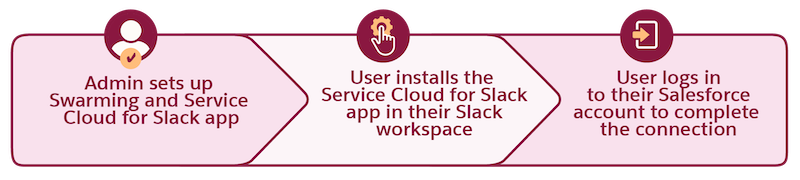
Your Salesforce admin set up the Service Cloud for Slack app for you! Get the app to get started, and then use Slack to streamline how you work with your service team and your customers.
New to using Slack? Check out the Slack Help.

| Resolve Complex Issues Faster with Swarming in Slack |
|
Set Up Slack |
Set Up Slack for Swarming |
Collaborate and Take Action |






- Get the Service Cloud for Slack App
To get started with Swarming in Slack, install the Service Cloud for Slack app in your Slack workspace. Only the Salesforce orgs that your Salesforce admin completed the Slack app setup for can connect to the Service Cloud for Slack app. - Add the Service Cloud for Slack App to an Existing Channel
Use the Service Cloud for Slack app to swarm in a channel that was created without a Swarming flow. - Start a Swarm in Slack
To collaborate with subject matter experts and quickly resolve customer issues, swarm in a Slack channel. You can start a swarm from a record in Salesforce or from a Slack channel with the Service Cloud for Slack app installed. - Salesforce Actions in Slack
Search, edit, and create Salesforce records from the Service Cloud for Slack app.