Track your reps’ distances that qualify for reimbursement when your reps rely on
Salesforce Maps for customer visits. Your reps benefit from you automating distance tracking,
because they get more time to focus on growing the business.
Required Editions
| User Permissions Needed |
| To configure installed packages: |
Customize Application |
-
From Setup, in the Quick Find box, enter Installed Packages, and
then select Installed Packages.
-
Click Configure next to the Salesforce Maps package.
-
Select Mileage Administration.
-
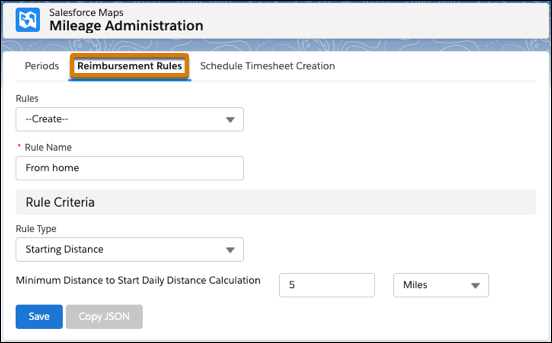
Under Reimbursement Rules, select Create. Add a rule name that
corresponds with the type of rule that you select for starting or stop-based distances.
-
Specify parameters for distances that don’t qualify for reimbursement.
For example, your company reimburses for all distances except the first 5 miles from your
reps’ homes. You create a starting distance rule with a minimum distance to start calculations
for 5 miles.
-
Save your work.