---
schema_version: "1"
id: 753d71e06fa7caabf75046cad5718db8a670096080f8e13bd9c3719a90503330
title: Create Distance Reimbursement Rules in Salesforce Maps
collection: admin
version: current
locale: en-us
portal_url: https://docs.salesforce.com/admin/current/en-us/sales/264-0-0/salesforce_maps_setup_timesheets_reimbursement_rules.md
canonical_url: https://help.salesforce.com/s/articleView?id=sales.salesforce_maps_setup_timesheets_reimbursement_rules.htm&release=264.0.0&type=5
source_site: help.salesforce.com
content_type: documentation
content_hash: cf62047f09f051524ae5b9a3e817fa4c8b8975df851dda32b7096a798b7d8fdb
description: Track your reps’ distances that qualify for reimbursement when your reps rely on Salesforce Maps for customer visits. Your reps benefit from you automating distance tracking, because they get more time to focus on growing the business.
products:
- Sales
- Salesforce Maps
release: "264"
---
# Create Distance Reimbursement Rules in Salesforce Maps
Track your reps’ distances that qualify for reimbursement when your reps rely on Salesforce Maps for customer visits. Your reps benefit from you automating distance tracking, because they get more time to focus on growing the business.
### Required Editions
1. From Setup, in the Quick Find box, enter Installed Packages, and then select **Installed Packages**.
2. Click **Configure** next to the Salesforce Maps package.
3. Select **Mileage Administration**.
4. Under Reimbursement Rules, select **Create**. Add a rule name that corresponds with the type of rule that you select for starting or stop-based distances.
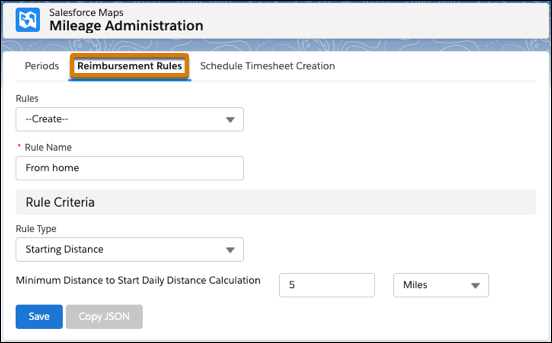
5. Specify parameters for distances that don’t qualify for reimbursement.
For example, your company reimburses for all distances except the first 5 miles from your reps’ homes. You create a starting distance rule with a minimum distance to start calculations for 5 miles.
6. Save your work.