| Available in: Lightning Experience in Enterprise, Performance,
and Unlimited editions with Sales and Einstein for Sales. |
| User Permissions
Needed |
| To review, edit, or approve an Agentforce Engagement email to a
prospect: |
Use Engagement App
AND
Sales Engagement User
OR
Sales
Engagement Cadence Creator
AND
Ownership of the
prospect
OR
Configure Engagement App
|
Watch the video to see how to review, edit, and approve agent emails.
Review emails in the Activity
Timeline
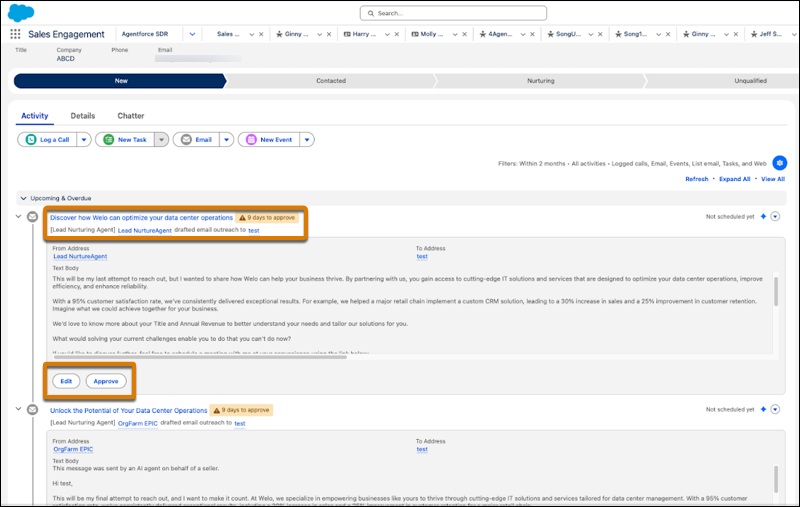
To review emails in a prospect’s Activity Timeline, open the
lead, contact, or person account record and view the Timeline. Emails that are generated and
waiting for review appear in the Timeline.
To view the content and details of an
email, click to expand it. To make changes, click Edit. To send the
email as-is, click Approve.
Review emails in the Engagement Control Center
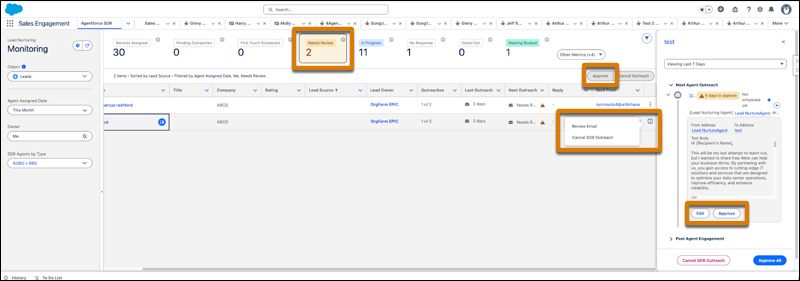
To see
a list of emails awaiting review in the Control Center, click the Needs
Review total.
To approve, edit, or cancel an email, click the Action
menu next to the email and choose Review Email.