Anticipate ramp-up time for new reps and consider tenure of experienced ones when you
plan quotas. Also, consider seasonal sales patterns and other realities that affect your
business in Quota Planning.
Required Editions
| Available in: both Salesforce Classic (not available in all orgs) and Lightning Experience |
| Available for an additional cost in: Enterprise, Performance, Unlimited, and Developer Editions with Sales Planning in English only, and only if you have Web Services API enabled |
| User Permissions
Needed |
| To plan quotas: |
One of these:
- Sales Planning Admin permission set
- Sales Planning Ops Manager permission set
- Sales Planning Ops Analyst permission set
|
-
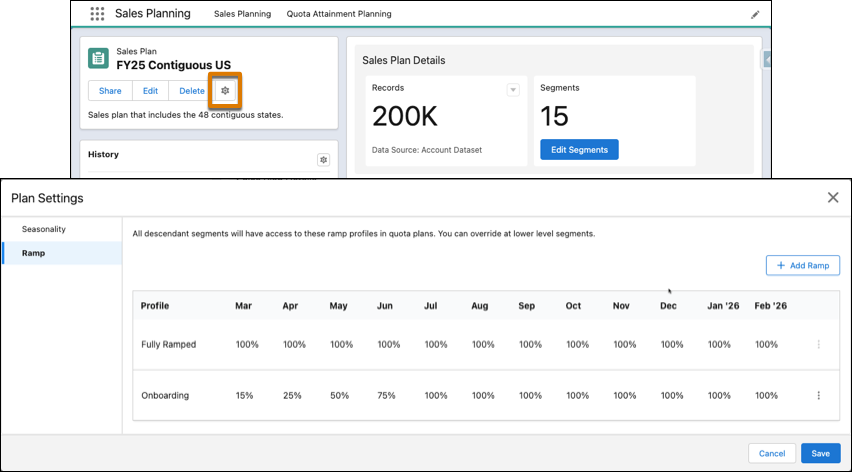
In Sales Planning, open a sales plan and click Settings.
-
Specify seasonal adjustments and add ramp profiles.
-
Save your changes.
-
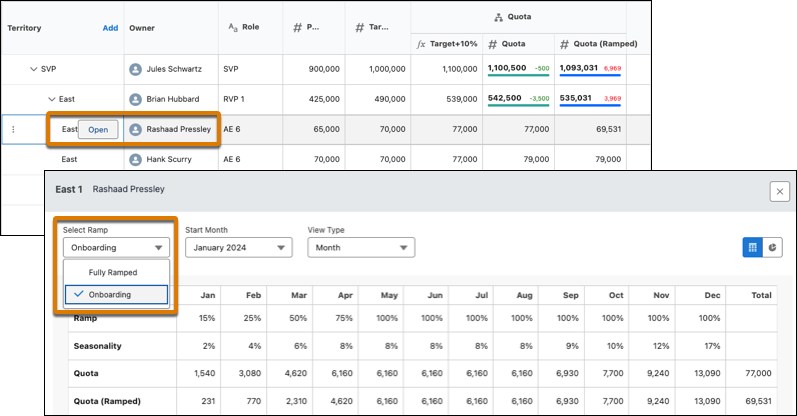
To account for a rep’s ramp in a quota plan, hover over the rep’s territory and select
Open. Then select a ramp profile.
Ramp-adjusted quotas appear in the Quota (Ramped) column.