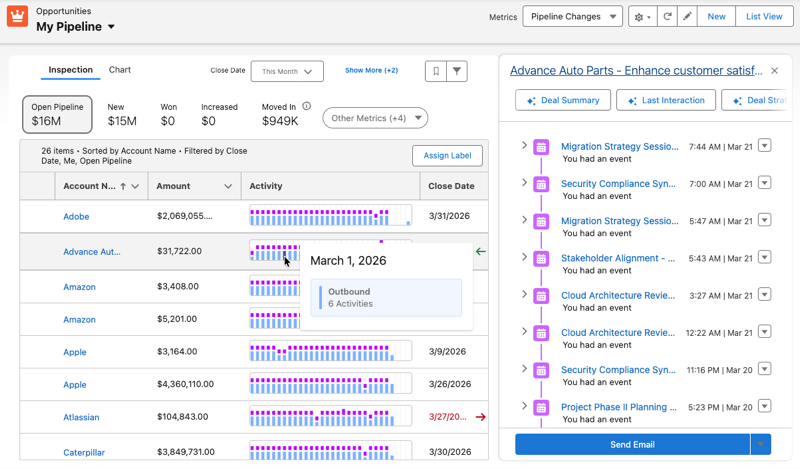
Add the Activity column in Pipeline Inspection to see a heatmap of engagement for each
opportunity. Use it to review the types of interactions taking place, compare customer-initiated
and seller-initiated activity, and decide which opportunities to follow up on first.
Required Editions
When you add the Activity column to your Pipeline Inspection view, you can gauge engagement
levels at a glance in an easily scannable heatmap view. The heatmap tracks inbound and
outbound interactions such as calls, events, and emails. Outbound entries reflect engagements
initiated by you, the seller, while inbound entries reflect customer-initiated engagement from
your contacts, leads, or opportunities.
These types of activities are tracked in the heatmap. Some activities only get counted when
they’re outbound. Manually created or manually logged tasks such as To-Do List items aren’t
tracked in the heatmap, but they remain visible in your activity timeline and in the Activity
tab on the side panel.
Outbound and Inbound Activities Tracked
| Activity Type |
Outbound |
Inbound |
| Completed cadence |
Yes |
No |
| Call |
Yes |
No |
| Event |
Yes |
No |
| Email |
Yes |
Yes |
| List email |
Yes |
No |
| Voice Call |
Yes |
Yes |
| Video Call |
Yes |
No |
| SMS (Text message) |
Yes |
Yes |
| Web message |
Yes |
Yes |