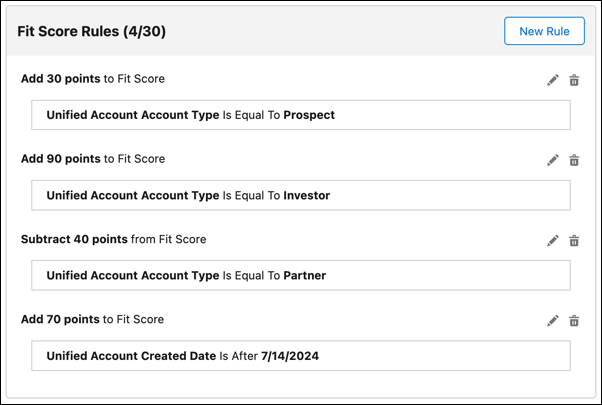
The Fit Score indicates how closely an account matches the characteristics of an ideal
customer for your business. A higher Fit Score indicates that this account aligns with the
characteristics of your ideal customer profile. In Prospecting Center, you can add rules to
define the Fit Score.
Required Editions
| Available in: Lightning Experience |
| Available with Sales Engagement, which is included with Sales in
Performance, Unlimited Editions, Agentforce 1 Edition, and
available for an extra cost in Professional and Enterprise Editions.
Sales Engagement is also available for an extra cost in Service and Lightning
Platform.
|
| User Permissions Needed |
| To give users access to the Sales Engagement app: |
Sales Engagement User |
Before you define the Fit Score rules, make sure that Prospecting Center is
enabled.
Add or modify the Fit Score rules, by adding points to each criteria, to calculate a Fit
Score.
-
Go to the Prospecting Center setup page.
-
Click Configure next to Configure Account Scoring.
-
To create a Fit Score rule, click New rule next to the Fit Score
Rules. You can add or modify the criteria on which the Fit Score is calculated.
-
To edit or remove the points assigned to a specific criteria, click
 next to a rule.
-
To save your changes, click Publish.