To score your accounts and act on the most accurate and data-driven prospects, spending less time in analyzing your customers, turn Prospecting Center and Account Scoring. After Prospecting Center is connected, your data from Data 360 is synced.
Required Editions
| Available in: Lightning Experience |
| Available with Sales Engagement, which is included with Sales in Performance, Unlimited Editions, Agentforce 1 Edition, and available for an extra cost in Professional and Enterprise Editions. Sales Engagement is also available for an extra cost in Service and Lightning Platform. |

Important Prospecting Center is scheduled for retirement in all Salesforce orgs
as of April, 2026. For existing customers, Prospecting Center remains available till April
2027.
| User Permissions Needed | |
|---|---|
| To give users access to the Sales Engagement app: | Sales Engagement User |
Make your selections based on your preferences on the Prospecting Center setup page, and then start using the Prospecting Center app.
- In Setup, enter Prospecting Center in the Quick Find box, and then click Prospecting Center.
- Click Select to choose a data space that is most relevant to you. After you select your data space, you can't modify your selection.
- To verify your permissions, see Enable Object and Field Permissions for CRM Connections.
- Enable Modify All for the Account, Lead, and Contact pages.
- Click Connect to make sure that the Data 360 is set up and connected. After Data 360 is connected, your data is synced to the Prospecting Center app. You can also use data connectors to bring in your data from a third party.
-
To add the respective Unified Account, Unified Individual DMOs, and Lead Identity
Resolution, click Select.
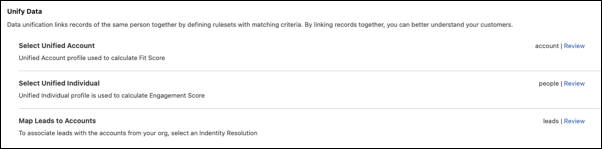
- To modify the selected DMOs, click Review.
- Turn on Prospecting Center.
- To bring in your data from an external data source, click Configure.
-
Select the created segments.
From the Prospecting Center, sales reps can see how marketing segments created in Data 360 by their marketing team correspond to their accounts.