
A backpack is a ZIP file that contains your content’s source files that you can download, back up, or upload. An individual backpack can be up to 50 MB. You can download a backpack for content that’s in your local Trailmaker Content workspace, or download a backpack for content published from Trailmaker Release.
Required Editions
| Available in: Enterprise, Performance, and Unlimited Editions |
| User Roles | |
|---|---|
| This topic supports these enablement site roles: |
|
A module and a trail are in separate backpacks so that it’s easier for you to maintain each content type. For example, if only one module in a published trail needs updates, you can download and reupload the backpack for just the module you want to update. It’s not necessary to download the trail backpack or the backpacks for the other modules.
You use a backpack for these activities:
- To store content in a version control system (VCS), you download a backpack from Trailmaker Content or Trailmaker Release.
- To update existing content in your enablement site, you download the backpack for the latest released version of content from Trailmaker Release, and then import the backpack into Trailmaker Content. Or, access the backpack from your VCS and import it into Trailmaker Content. Then, upload a new backpack that contains the updated content to an unpublished release.

Trail Backpack
For a trail, Trailmaker Content creates a backpack that contains these files:
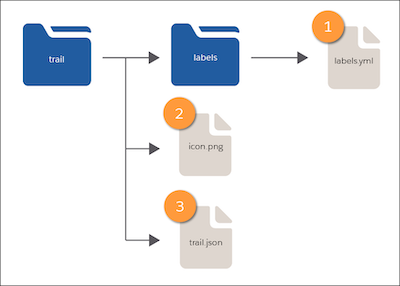
- A labels folder that contains a labels.yml file (1), which specifies the trail’s title and description.
- An icon.png file (2) for the trail art.
- A trail.json file (3) that specifies the trail’s metadata, including filters and a list of the associated module API names.
Module Backpack
For a module, Trailmaker Content creates a backpack that contains these files:
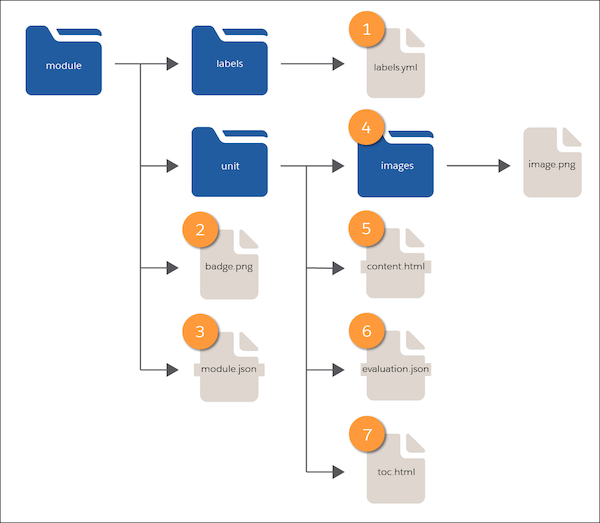
- A labels folder that contains a labels.yml file (1), which specifies the title and description for the module and its units.
- A badge.png file (2) for the module’s badge art.
- A module.json file (3) that specifies the metadata for the module and its units, including filters and points.
- A folder for each unit, which contains:
- An images subfolder (4), which contains the unit’s image files.
- A content.html file (5), which contains the unit’s text.
- An evaluation.json file (6), which contains the unit’s quiz data.
- A toc.html file (7), which contains the unit’s list of section headings.