---
schema_version: "1"
id: 983c292d2633a0b7b78ddce255070a1fce054c4d91dd3b6195583c4e7364487e
title: Backpacks for Trails and Modules
collection: admin
version: current
locale: en-us
portal_url: https://docs.salesforce.com/admin/current/en-us/sales/264-0-0/mth_backpacks_on_mytrailhead.md
canonical_url: https://help.salesforce.com/s/articleView?id=sales.mth_backpacks_on_mytrailhead.htm&release=264.0.0&type=5
source_site: help.salesforce.com
content_type: documentation
content_hash: b4bbaec0eb33bc7651517329a19fce79dea1f60bb951079c251c5ad169b5f80b
description: A backpack is a ZIP file that contains your content’s source files that you can download, back up, or upload. An individual backpack can be up to 50 MB. You can download a backpack for content that’s in your local Trailmaker Content workspace, or download a backpack for content published from Trailmaker Release.
products:
- Sales Cloud
- Sales Enablement
release: "264"
---
# Backpacks for Trails and Modules
A backpack is a ZIP file that contains your content’s source files that you can download, back up, or upload. An individual backpack can be up to 50 MB. You can download a backpack for content that’s in your local Trailmaker Content workspace, or download a backpack for content published from Trailmaker Release.
### Required Editions
Available in: Enterprise, Performance, and Unlimited Editions
User Roles
This topic supports these enablement site
roles:
Content Creators
Release Managers
Subject Matter Experts
A module and a trail are in separate backpacks so that it’s easier for you to maintain each content type. For example, if only one module in a published trail needs updates, you can download and reupload the backpack for just the module you want to update. It’s not necessary to download the trail backpack or the backpacks for the other modules.
You use a backpack for these activities:
- To store content in a version control system (VCS), you download a backpack from Trailmaker Content or Trailmaker Release.
- To update existing content in your enablement site, you download the backpack for the latest released version of content from Trailmaker Release, and then import the backpack into Trailmaker Content. Or, access the backpack from your VCS and import it into Trailmaker Content. Then, upload a new backpack that contains the updated content to an unpublished release.

Note Effective September 2021, Tags metadata is no longer required for trails, modules, or units. If you created any trails, modules, or units before September 2021, the backpack data retains the existing Tags filters and their assigned points. However, those Tags filters aren’t validated when you import or export the backpack. If you import an existing module to Trailmaker Content and modify the assigned points, Trailmaker reassigns all points to the General tag.
## Trail Backpack
For a trail, Trailmaker Content creates a backpack that contains these files:
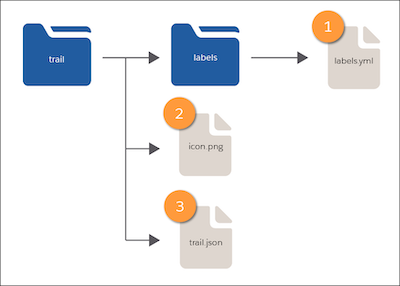
- A labels folder that contains a labels.yml file (1), which specifies the trail’s title and description.
- An icon.png file (2) for the trail art.
- A trail.json file (3) that specifies the trail’s metadata, including filters and a list of the associated module API names.
## Module Backpack
For a module, Trailmaker Content creates a backpack that contains these files:
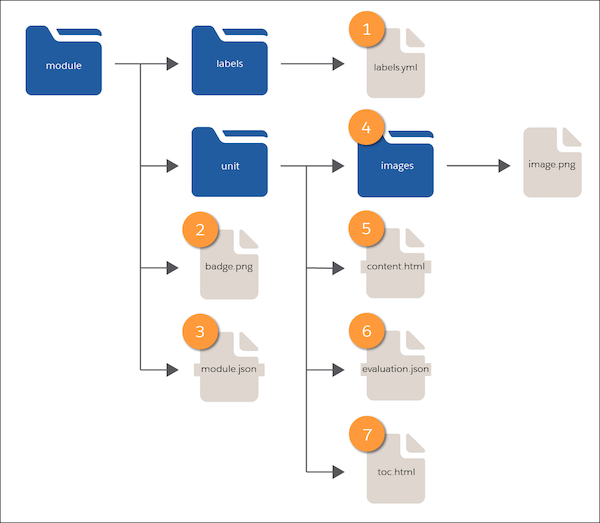
- A labels folder that contains a labels.yml file (1), which specifies the title and description for the module and its units.
- A badge.png file (2) for the module’s badge art.
- A module.json file (3) that specifies the metadata for the module and its units, including filters and points.
- A folder for each unit, which contains:
- An images subfolder (4), which contains the unit’s image files.
- A content.html file (5), which contains the unit’s text.
- An evaluation.json file (6), which contains the unit’s quiz data.
- A toc.html file (7), which contains the unit’s list of section headings.
#### See Also
- [Download a Backpack from Trailmaker Content](https://help.salesforce.com/s/articleView?id=sales.mth_download_content_from_tm_content.htm&release=264.0.0&type=5 "You can download the backpack ZIP file for a module or trail that’s in your Trailmaker Content workspace. Then, you can submit the backpack to your company’s version control system (VCS) so that other users can import the backpack into their own local Trailmaker Content workspace.")
- [Download a Backpack from Trailmaker Release](https://help.salesforce.com/s/articleView?id=sales.mth_tm_release_download.htm&release=264.0.0&type=5 "From Trailmaker Release, you can download the backpack ZIP file for a module or trail published in your company’s enablement site. With this backpack, your content creators can easily access the latest released version of content the next time they want to update it.")
- [API Names for Trails, Modules, and Units](https://help.salesforce.com/s/articleView?id=sales.mth_api_names_on_mytrailhead.htm&release=264.0.0&type=5 "Each content collection, release, trail, module, and unit on your enablement site has its own API name, which is a globally unique ID that references a content path in URLs.")
- [Metadata for Trails, Modules, and Units](https://help.salesforce.com/s/articleView?id=sales.mth_metadata_on_mytrailhead.htm&release=264.0.0&type=5 "When you create trails, modules, and units, you also create metadata about your content, such as the title, description, and target audience. Learners can filter the content on your enablement site based on the metadata values you assign.")
- [Guidelines for Localizing Files in a Backpack](https://help.salesforce.com/s/articleView?id=sales.mth_localize_files.htm&release=264.0.0&type=5 "Your localization team or vendor can localize only certain trail, module, unit, and quiz information in your backpack’s files.")
- [Export All Published and Archived Content from an Enablement Site](https://help.salesforce.com/s/articleView?id=sales.mth_content_export.htm&release=264.0.0&type=5 "To back up all content that’s been published or archived on your enablement site, you can quickly download backpacks of all published and archived trails and modules. This option is also useful when you want to transfer your content to another system.")