
Cadences are a great tool for qualifying large numbers of leads and other prospects. Sales Engagement assigns a disposition to each prospect when they finish or exit a cadence. The disposition indicates how the target responded to the cadence, so you can see which targets to invest in further. You can view target dispositions in reports.
Required Editions
| Available in: Lightning Experience |
| Available with Sales Engagement, which is included with Sales in Performance, Einstein 1, and Unlimited Editions, and available for an extra cost in Professional and Enterprise Editions. Sales Engagement is also available for an extra cost in Service and Lightning Platform. |
Cadence targets receive one of these dispositions when they exit a cadence.
| Disposition | Description |
|---|---|
| Success | The sales rep successfully connected with the target. The customer shows interest in moving ahead with a deal. |
| Customer Engaged | The target opened an email, or clicked a link in an email. |
| Customer Connected | The target replied to an email or the call outcome was Meaningful Connect. |
| Contact Later | The target should be contacted again later. |
| No Response | The target didn’t respond. |
| Not Interested | The target isn’t interested |
| Disqualified | The target doesn’t meet your buyer qualifications. |
| Bad Data | The target’s Email, Phone, Name, or Company isn’t valid. |
| Duplicate | The target is a duplicate record. |
Cadence targets can receive a disposition automatically or manually.
- Automatically
- Targets can exit a cadence automatically in a few ways.
- When a lead target converts, the assigned disposition is Success.
- When the last action of the cadence is a call, the assigned disposition is based on the
call result.
Call Result Disposition Meaningful Connect Customer Engaged Left Voicemail Contact Later Call Back Later Contact Later Not Interested Not Interested Disqualified Disqualified Depending on your Computer Telephony Integration (CTI), administrators can customize these call result mappings. For more information, see Define Call Result Values for Cadence Branching.
- If the last action of the cadence is an email and it’s followed by a listener step, the
assigned disposition is based on the results of the email.
Email Engagement Disposition Reply Customer Connected Link clicked Customer Engaged Open Customer Engaged Out of Office Contact Later Bounce Bad Data If there isn’t a listener step after the email, the target completes the cadence and a disposition isn’t assigned.
- Manually
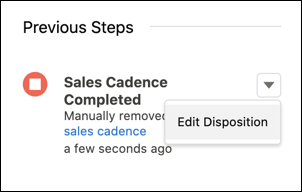
- When a sales rep removes a target from a cadence, they can assign a disposition at the
same time. Sales reps can update the disposition in the Sales Engagement component on the
target’s lead, contact, or person account record.
You can view target dispositions in standard and custom reports.
- Add the Disposition field to the Cadence Completion Reason report.
- Create a report from any of the custom report types that include cadence trackers.