
A duplicate record set is a list of items identified as duplicates. It’s created when a duplicate rule or job runs. Let your Lightning Experience users merge duplicates by granting them access to duplicate record sets.
Required Editions
| Available in: Lightning Experience and Salesforce Classic (not available in all orgs) |
| Available in: Essentials, Professional, Enterprise, Performance, Unlimited, and Developer Editions |
| User Permissions Needed | |
|---|---|
| To view duplicate record sets and items: | View on accounts, contacts, or leads |
| To merge duplicate record items: | Edit and Delete on accounts, contacts, or leads |
You can grant access to duplicate record sets and duplicate record items to users with a Sales Cloud, Service Cloud, or Sales & Service Cloud license.
Duplicate record sets containing the results of duplicate jobs don’t include a link to the job by default. To include the link, use Lightning App Builder to add the Parent field to your duplicate record set layout.
-
View duplicate record sets.
- In Lightning Experience, from the App Launcher, open
Duplicate Record Sets.
 Note In list views, duplicate record sets are displayed in Table view only.
 - In Salesforce Classic, click the Duplicate Record Sets tab.
- In Lightning Experience, from the App Launcher, open
Duplicate Record Sets.
-
To manage duplicates that aren’t surfaced by a duplicate rule, create a
duplicate record set.
- On a duplicate record set list view, click New.
- Specify a duplicate rule (in the Duplicate Rule field) or a duplicate job (in the Parent field).
- In Lightning Experience, in the Related tab, click New. In Salesforce Classic, on the duplicate record set detail page, click New Duplicate Record Item.
-
In Lightning Experience only, merge duplicates in a set by selecting the
Compare and Merge action.
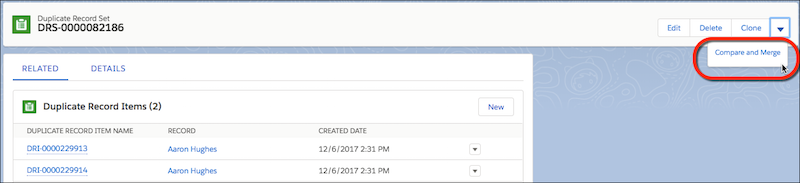 To let users merge duplicates in sets, give them access to duplicate record sets in Lightning Experience.