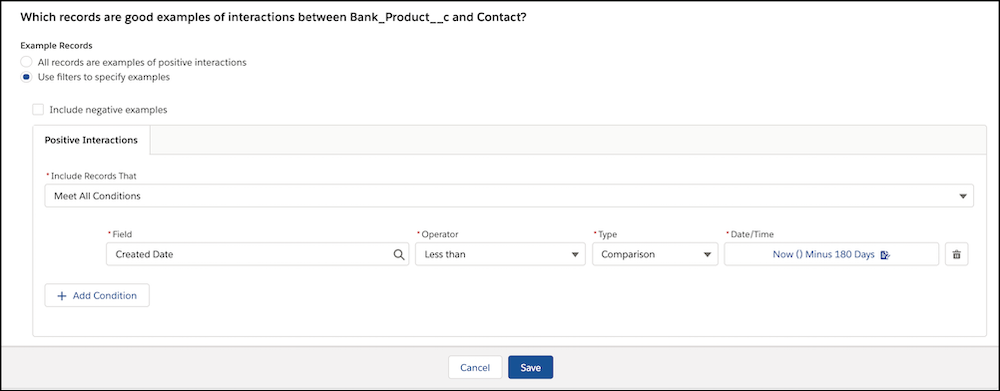
To get the most out of your Einstein recommendation, provide examples of positive and negative interactions.
Interactions provide important information for building a recommendation. Positive interactions refer to the outcome you desire. Negative interactions refer to the outcome you don’t want. Einstein Recommendation Builder treats all records as positive interactions by default, but if you have the data available, you can:

Note Use cases sometimes don’t have negative examples. For instance, a service case (Recipient)
can be related to a solution (Recommended Items) that resolved a customer issue. But the case
doesn’t have relationships to solutions that didn’t work.
- To specify records that Einstein has to treat as positive interactions, add filters.
- Include examples of negative interactions.
- In the Interactions section, Select Example Records.
- Click Use filters to specify examples. Add one or more conditions to define which records are examples of positive interactions between the Recipient and Recommended Items object.
- To define negative examples, select Include negative examples. On the Negative Interactions tab, set up your condition logic to define examples of negative interactions.

Tip Carefully define your examples because Einstein uses these records to
optimize recommendations. Select the interaction records that represent the desired outcome.
For example, if you recommend products to enterprise accounts, focus on opportunities that
have a Closed - Won status, or have progressed to a desired stage.