To better protect your Salesforce org’s data, you can restrict who can view record names in lookup fields and system fields, such as Created By and Last Modified By. If you enable the Require permission to view record names in lookup fields setting, users must have Read access to these records or the View All Lookup Record Names permission to view this data.
Required Editions
| Available in: both Salesforce Classic and Lightning Experience |
| Available in: Professional, Enterprise, Performance, Unlimited, and Developer Editions |
| User Permissions Needed | |
|---|---|
| To modify sharing settings: | Manage Sharing |

- From Setup, in the Quick Find box, enter Sharing Settings, and then select Sharing Settings.
- Click Edit in the Organization-Wide Defaults area.
- Select Require permission to view record names in lookup fields.
- Enable the View All Lookup Record Names permission in custom profiles or permission sets for users who must see record names in all lookup and system fields, regardless of sharing settings.

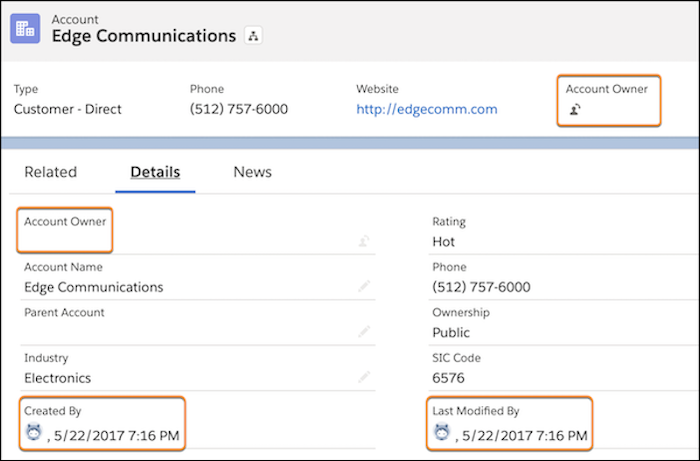
After the Require permission to view record names in lookup fields setting is enabled, in Lightning Experience, users who don’t have Read access or the View All Lookup Record Names permission see the lookup field labels, but not the data in the fields.
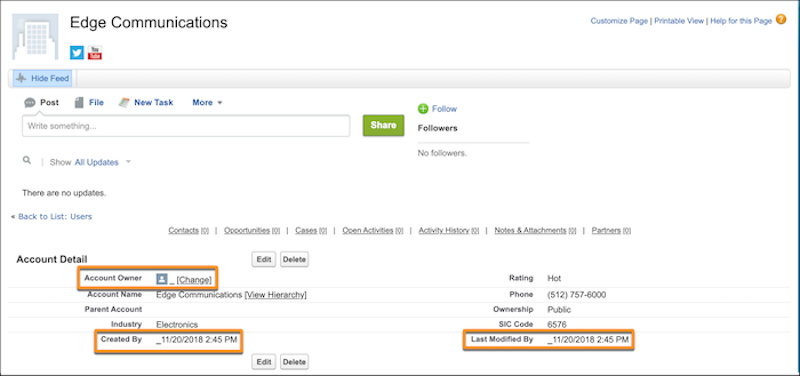
In Salesforce Classic, users who don’t have Read access or the View All Lookup Record Names permission see an underscore in system user lookup fields. They also see the record ID in custom user lookup and non-user lookup fields.