---
schema_version: "1"
id: 22ea69a3d2c42519c1656805b9388d2e3e6c3041e9e8779e9e199f0a92748435
title: Require Permission to View Record Names in Lookup Fields
collection: admin
version: current
locale: en-us
portal_url: https://docs.salesforce.com/admin/current/en-us/platform/264-0-0/security_sharing_require_permission_lookup.md
canonical_url: https://help.salesforce.com/s/articleView?id=platform.security_sharing_require_permission_lookup.htm&release=264.0.0&type=5
source_site: help.salesforce.com
content_type: documentation
content_hash: bbb7b0125d7d848611f8511d4dbf1a70794b0b0a1731f9f58584954b36b2f061
description: To better protect your Salesforce org’s data, you can restrict who can view record names in lookup fields and system fields, such as Created By and Last Modified By. If you enable the Require permission to view record names in lookup fields setting, users must have Read access to these records or the View All Lookup Record Names permission to view this data.
products:
- Security
- Salesforce Platform
release: "264"
---
# Require Permission to View Record Names in Lookup Fields
To better protect your Salesforce org’s data, you can restrict who can view record names in lookup fields and system fields, such as Created By and Last Modified By. If you enable the Require permission to view record names in lookup fields setting, users must have Read access to these records or the View All Lookup Record Names permission to view this data.
### Required Editions
Available in: both Salesforce Classic and Lightning Experience
Available in: Professional, Enterprise, Performance, Unlimited, and Developer Editions
User Permissions Needed
To modify sharing settings:
Manage Sharing

Note The View All Lookup Record Names permission only applies to lookup record names in list views and record detail pages. Lookup record names are visible in history tracking related lists. To prevent users from viewing record names in history tracking related lists, disable field history tracking.
1. From Setup, in the Quick Find box, enter Sharing Settings, and then select **Sharing Settings**.
2. Click **Edit** in the Organization-Wide Defaults area.
3. Select **Require permission to view record names in lookup fields**.
4. Enable the View All Lookup Record Names permission in custom profiles or permission sets for users who must see record names in all lookup and system fields, regardless of sharing settings.

Example
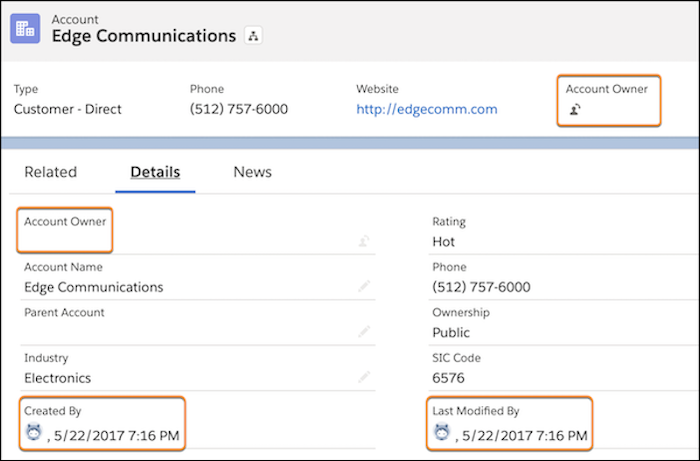
After the Require permission to view record names in lookup fields setting is enabled, in Lightning Experience, users who don’t have Read access or the View All Lookup Record Names permission see the lookup field labels, but not the data in the fields.
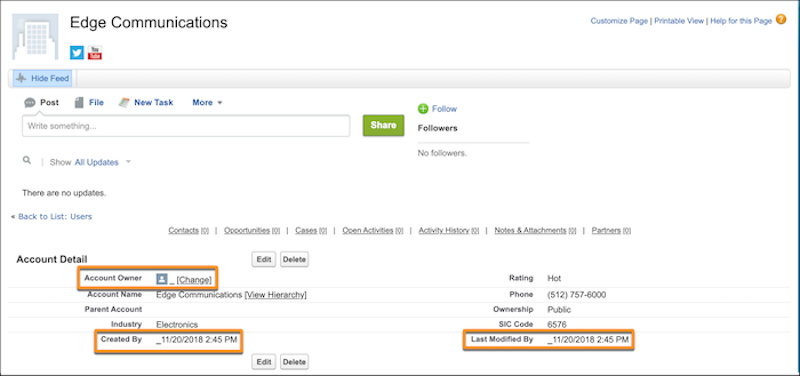
In Salesforce Classic, users who don’t have Read access or the View All Lookup Record Names permission see an underscore in system user lookup fields. They also see the record ID in custom user lookup and non-user lookup fields.

Note In Lightning Experience, a parent record's name is visible in lookup fields if the user has access to its child record via a "View All Records" permission. This behavior applies even if the user doesn't have access to the parent record. In Salesforce Classic, the parent record's ID is displayed instead of its name.
#### See Also
- [“View All” and “Modify All” Permissions Overview](https://help.salesforce.com/s/articleView?id=platform.users_profiles_view_all_mod_all.htm&release=264.0.0&type=5 "The “View All” and “Modify All” permissions ignore sharing rules and settings, allowing administrators to grant access to records associated with a given object across the organization. “View All Records” and “Modify All Records” can be better alternatives to the “View All Data” and “Modify All Data” permissions.")
- [Require Permission to View Record Names in Lookup Fields](https://help.salesforce.com/s/articleView?id=platform.security_sharing_require_permission_lookup.htm&type=5&language=en_US)