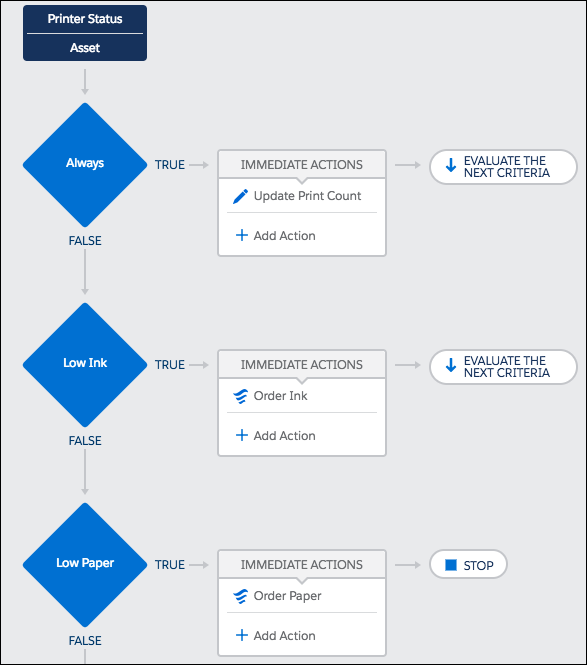
The example demonstrates how you can use Process Builder to subscribe to and evaluate a platform event.
Required Editions
| Available in both Salesforce Classic and Lightning Experience |
| Available in: Performance, Unlimited, Enterprise, and Developer Editions |

Important Starting in Summer ’23, you can’t create new processes. You can still
activate, deactivate, and edit any existing processes. To migrate existing processes, use
the Migrate to Flow tool. For
new automations, create flows in Flow Builder.
Using platform events and the Salesforce REST API, your printer publishes a Printer Status event at the end of each work day. This event includes the printer’s serial number, how much ink and paper it has, and how many pages it has printed in total.
When Salesforce receives the Printer Status event, your Printer Management process uses the serial number to find a matching asset in your Salesforce org.
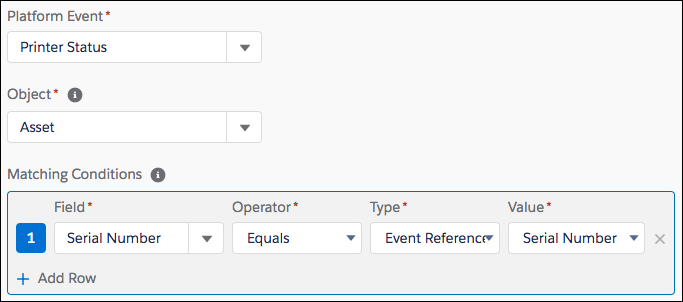
If the process finds a match, it evaluates the event’s data.
- The first criteria always update the asset’s print count.
- The second criteria checks if the ink is low. If so, it launches a flow that orders more ink and assigns a service technician to install the ink cartridge.
- The third criteria checks if the paper is low. If so, it launches a flow that orders more paper and assigns a service technician to add the paper.