
Create an authentication provider to facilitate authentication with Salesforce.
Required Editions
| Available in: all editions except Starter |
| User Permissions Needed | |
|---|---|
| To create authentication providers | Customize Application AND Manage Auth. Providers |
Before you complete this task, Create a Connected App for the Tooling API.

Important Connected apps creation is restricted as of Spring ‘26. You can
continue to use existing connected apps during and after Spring ‘26. However, we recommend
using external client apps instead. If you must continue
creating connected apps, contact Salesforce Support.
See New connected apps can no longer be created in Spring ‘26 for more details.
- Open Setup in a separate tab from the previous task.
- In the Quick Find box, enter Auth. Providers, and select that option.
- Click New.
- Select Salesforce as the Provider Type.
-
Complete the required fields.
- Set the Consumer Key and Consumer secret using the values from the Create a Connected App for the Tooling API task.
- Set the Default Scopes to: refresh_token full
- Save your changes.
- Copy the value of the Callback URL.

Example
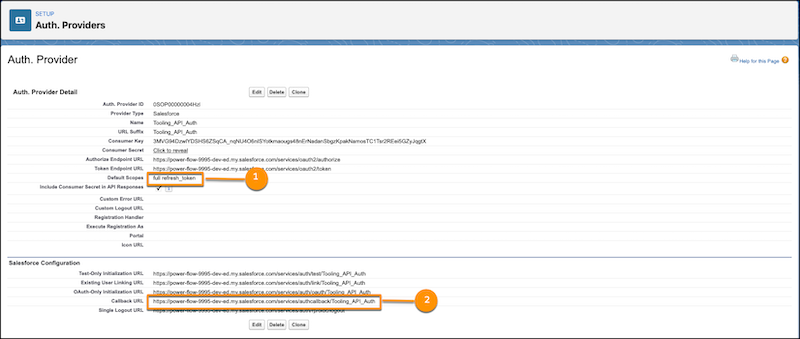
Authentication Provider Example with Scopes and Callback URL Highlighted
(1) the Default Scopes. (2) the Callback URL value to copy.
With the value of the Callback URL in the authentication provider, update the callback URL in the connected app. Continue to Update the Callback URL in the Connected App.