---
schema_version: "1"
id: fe4f79ae531cea1c85f2446e1e11481748a853b836708e45c1b9b59fc24077cc
title: Create an Authentication Provider for the Tooling API
collection: admin
version: current
locale: en-us
portal_url: https://docs.salesforce.com/admin/current/en-us/platform/264-0-0/perm_uapa_create_auth_provider.md
canonical_url: https://help.salesforce.com/s/articleView?id=platform.perm_uapa_create_auth_provider.htm&release=264.0.0&type=5
source_site: help.salesforce.com
content_type: documentation
content_hash: d2d3415031c0ede2eb672c2afd7c3d20093d7a37f44495adc857dfac8ce31fd9
description: Create an authentication provider to facilitate authentication with Salesforce.
products:
- Security
- Salesforce Platform
release: "264"
---
# Create an Authentication Provider for the Tooling API
Create an authentication provider to facilitate authentication with Salesforce.
### Required Editions
Available in: all editions except Starter
User Permissions Needed
To create authentication providers
Customize Application AND Manage Auth. Providers
Before you complete this task, [Create a Connected App for the Tooling API](https://help.salesforce.com/s/articleView?id=platform.permissions-uapa-create-a-connected-app.htm&release=264.0.0&type=5 "Create a new connected app for the User Access and Permissions Assistant.").

Important Connected apps creation is restricted as of Spring ‘26. You can continue to use existing connected apps during and after Spring ‘26. However, we recommend using [external client apps](https://help.salesforce.com/s/articleView?id=xcloud.external_client_apps.htm&language=en_US) instead. If you must continue creating connected apps, contact Salesforce Support.
See [New connected apps can no longer be created in Spring ‘26](https://help.salesforce.com/s/articleView?id=005228017&type=1&language=en_US) for more details.
1. Open Setup in a separate tab from the previous task.
2. In the Quick Find box, enter Auth. Providers, and select that option.
3. Click **New**.
4. Select Salesforce as the Provider Type.
5. Complete the required fields.
1. Set the Consumer Key and Consumer secret using the values from the [Create a Connected App for the Tooling API](https://help.salesforce.com/s/articleView?id=platform.permissions-uapa-create-a-connected-app.htm&release=264.0.0&type=5 "Create a new connected app for the User Access and Permissions Assistant.") task.
2. Set the Default Scopes to: refresh\_token full
6. Save your changes.
7. Copy the value of the Callback URL.

Example
**Authentication Provider Example with Scopes and Callback URL Highlighted**
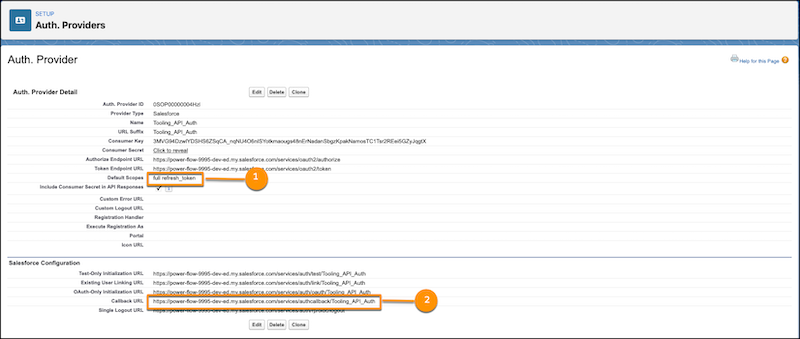
(1) the Default Scopes. (2) the Callback URL value to copy.
With the value of the Callback URL in the authentication provider, update the callback URL in the connected app. Continue to [Update the Callback URL in the Connected App](https://help.salesforce.com/s/articleView?id=platform.perm_uapa_update_callback_URL.htm&release=264.0.0&type=5 "Update the value of the callback URL in the connected app to use the value from the authentication provider.").