
Customize the Review Service Appointment screen and the options that appear on the screen.
Required Editions
| Available in: Lightning Experience. |
| Available in: Enterprise and Unlimited Editions |
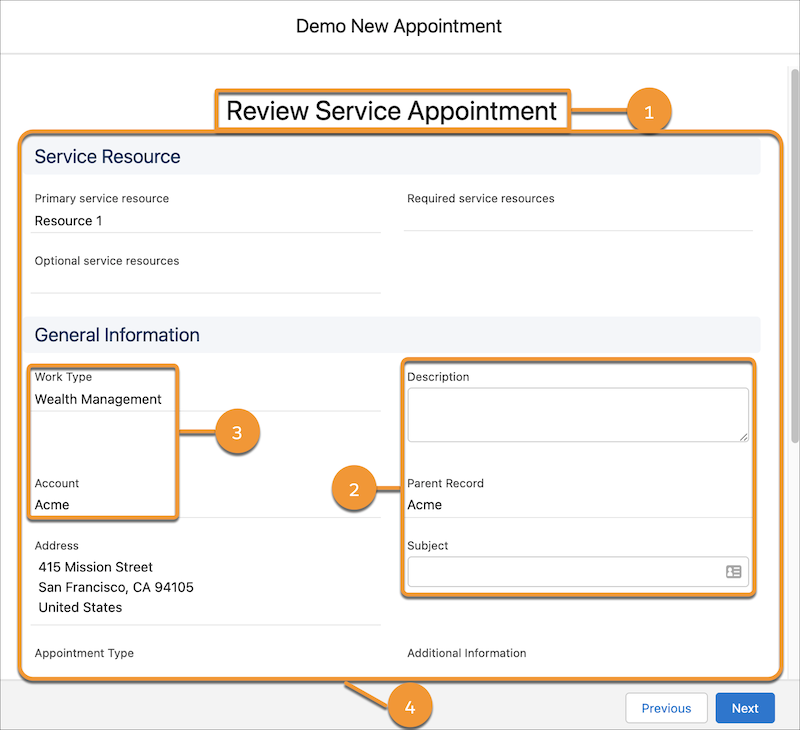
| UI Element | How to Customize the Element |
|---|---|
| The title (1) | Change Labels in Flow Screens |
| The default values in fields, such as Subject and Description (2) | Autofill Fields in the Appointment Review Screen |
| The values in fields, such as Work Type and Account (3) | Flow Screen Component: Review Service Appointment |
| The layout, the fields that appear, and the field labels (4) | |
| The Review Service Appointment screen |
If you want to customize the Review Service Appointment screen beyond the inbuilt customization options, you can create your own screen. For more information, see Considerations for Creating a Custom Review Service Appointment Screen.