
Debug a screen flow that uses information collected from the screen flow's registration form to create a contact for each policy beneficiary.
Required Editions
| View supported editions. |
| User Permissions Needed | |
|---|---|
| To open, edit, create, activate or deactivate a flow using all flow types, elements, and features available in Flow Builder, including Einstein and Agentforce for Flow: | Manage Flow |

Note You don't need to be an admin to have the Manage Flow permission.
Ask your admin to add it to your profile or permission set.
Before activating and distributing your screen flow, you debug the flow to troubleshoot any flow failure.
- Create or open the Registration forms screen flow in Flow Builder.
- Click Debug.
-
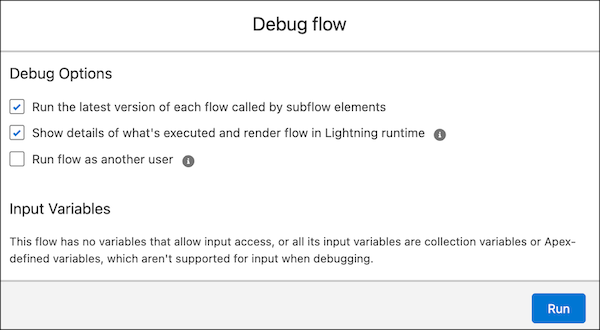
Set the debug options.
If you want to run the flow as another user, ensure that Let admins debug flows as other users is enabled in Process Automation Settings.
-
Click Run.
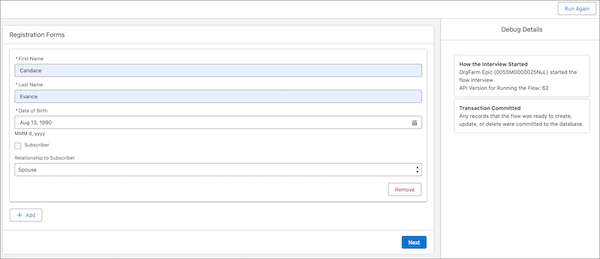
The debug details for the run appear in a panel on the right.
-
Enter the values in the required fields.
- Click Next.
- Review the Debug Details to see the results.
-
(Optional) To restart the flow by using the same or different values for the input
variables, click Change Inputs or Run Again.
You can’t convert the debug run to a test in the screen flow.