
A work item includes a status and progress indicator so your team can quickly understand where work stands in the release cycle. Work items move through these statuses: New, In Progress, In Review, Ready to Promote, Promoted, and Closed.
Required Editions
| Available in: Lightning Experience in Professional (API access required), Enterprise, Performance, Unlimited, and Developer Editions |
| Not available in: Government Cloud Plus. Contact your Salesforce account executive for more details. |
| Not available in: EU Operating Zone. EU Operating zone is a special paid offering that provides an enhanced level of data residency commitment. Lifecycle Center is supported in orgs in the EU that aren’t part of EU OZ, per standard product terms and conditions. |
Work items start in the New status, indicating that development work hasn't begun. As work items move through the release management cycle, Lifecycle Center updates the status automatically to show progress.
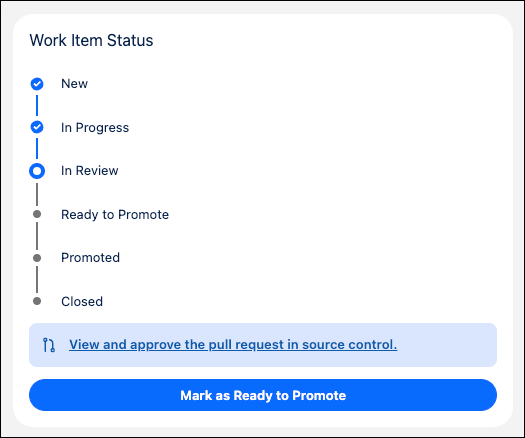
Your team reviews a list of project work items to understand how much work is done and how much is left to do.
| STATUS | Description |
|---|---|
| New | The initial state when a work item is created. Optionally select a development environment to begin work; the status changes to In Progress. |
| In Progress | Building the requirements is in progress. Lifecycle Center creates a feature branch for the work item. |
| In Review | Work is ready for team review. The status changes to In Review when a pull request is created—from DX Inspector or directly in source control by a team member or agent. |
| Ready to Promote | The work item is approved and ready for promotion, with no merge conflicts. |
| Promoted | The work item has moved to a pipeline stage. When it’s promoted to the final pipeline stage, it's closed. |
| Closed | Work is complete, verified, and promoted through the entire pipeline. |