
If your team recently migrated from DevOps Center (Managed Package) to Lifecycle Center, remove your existing DX Inspector connection and reconnect to Lifecycle Center so that your commits go to the right project.
Required Editions
| Available in: Lightning Experience in Professional (API access required), Enterprise, Performance, Unlimited, and Developer Editions |
| Not available in: Government Cloud Plus. Contact your Salesforce account executive for more details. |
| Not available in: EU Operating Zone. EU Operating zone is a special paid offering that provides an enhanced level of data residency commitment. Lifecycle Center is supported in orgs in the EU that aren’t part of EU OZ, per standard product terms and conditions. |
| User Permissions Needed | |
|---|---|
| To reconnect DX Inspector: | Customize Application in your development org |
| To reconnect DX Inspector: | Lifecycle Center User in Lifecycle Center Hub org |
Before you reconnect, confirm that Lifecycle Center is accessible from the App Launcher and that your admin migrated your team's projects. See Access Lifecycle Center and Migrate to Next Generation Lifecycle Center.
Your team migrates DevOps Center (Managed Package) projects to Lifecycle Center with the migration tool. See Migrate to Lifecycle Center. After migration, DX Inspector in your development environment can still point to the managed package. Remove that connection and reconnect to Lifecycle Center so that your work items and commits go to the migrated project.
- Log in to your sandbox, scratch org, or Developer Edition org.
-
Click
 on DX Inspector to open the DX Inspector panel.
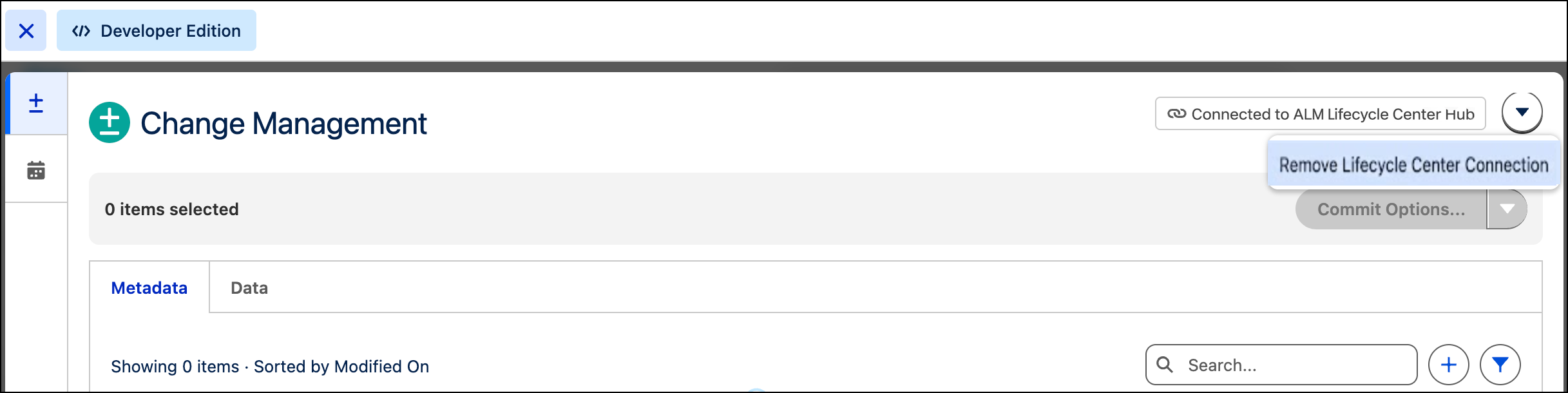
- From the DX Inspector panel, open the Change Management tab.
-
Click the down arrow icon and select Remove Lifecycle Center
Connection.
- From the banner, click Sign in to Lifecycle Center.
-
In the window, enter your Lifecycle Center credentials.
DX Inspector connects to Lifecycle Center. Your commits and work items now go to the migrated project.