
Configure negative assertions to verify that a flow handles errors gracefully when you use automated testing.
Required Editions
| View supported editions. |
| User Permissions Needed | |
|---|---|
| To open, edit, create, activate or deactivate a flow using all flow types, elements, and features available in Flow Builder, including Einstein and Agentforce for Flow: | Manage Flow |
Configure negative assertions for Create Records, Update Records, Delete Records, and Action elements in any flow that uses automated testing, including autolaunched, record-triggered, and Data Cloud-triggered flows.
For more information about configuring assertions when you set up a test scenario in test mode, see Set Up and Run a Test Scenario (Beta).
- Create a flow test scenario.
- When you set assertions, select a resource for Create Records, Update Records, Delete Records, or Action elements.
- For Operator, select Has Error.
- Select a value, and save the flow test scenario.
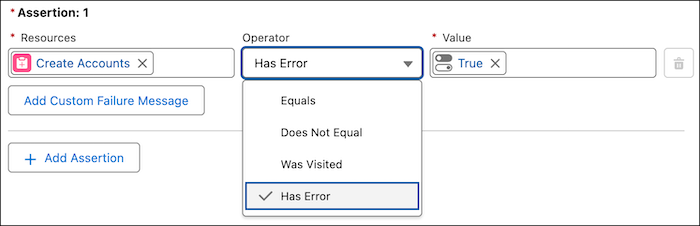

Example
Consider a flow that processes customer data. You can create a test scenario to make sure that the flow handles invalid input, such as a missing required field.