---
schema_version: "1"
id: 75187b4bf2ee245d80f52bc78ae4f4b32e95d4e895144c638ffbbfdf99794e54
title: Test a Flow for Error Handling
collection: admin
version: current
locale: en-us
portal_url: https://docs.salesforce.com/admin/current/en-us/platform/264-0-0/automate_flow_test_error_handling.md
canonical_url: https://help.salesforce.com/s/articleView?id=platform.automate_flow_test_error_handling.htm&release=264.0.0&type=5
source_site: help.salesforce.com
content_type: documentation
content_hash: de7d51a34146362074c9f590990affbbaca5e50ccdf7fe030eef2f96a4dd93d4
description: Configure negative assertions to verify that a flow handles errors gracefully when you use automated testing.
products:
- Flow Builder
- Salesforce Platform
release: "264"
---
# Test a Flow for Error Handling
Configure negative assertions to verify that a flow handles errors gracefully when you use automated testing.
### Required Editions
To open, edit, create, activate or
deactivate a flow using all flow types, elements, and features available in Flow
Builder, including Einstein and Agentforce for Flow:
Manage Flow
Configure negative assertions for Create Records, Update Records, Delete Records, and Action elements in any flow that uses automated testing, including autolaunched, record-triggered, and Data Cloud-triggered flows.
For more information about configuring assertions when you set up a test scenario in test mode, see [Set Up and Run a Test Scenario (Beta)](https://help.salesforce.com/s/articleView?id=platform.automate_flow_test_mode_scenario.htm&release=264.0.0&type=5 "Configure test data and run options, and then run the scenario in Test Mode (beta).").
1. Create a flow test scenario.
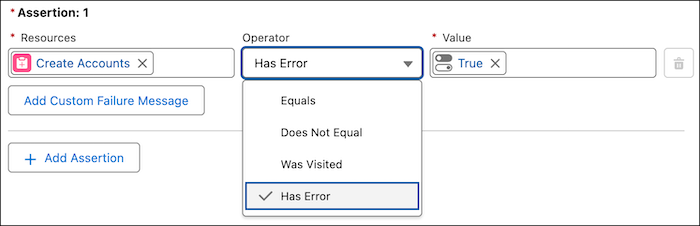
2. When you set assertions, select a resource for Create Records, Update Records, Delete Records, or Action elements.
3. For Operator, select **Has Error**.
4. Select a value, and save the flow test scenario.

Example
Consider a flow that processes customer data. You can create a test scenario to make sure that the flow handles invalid input, such as a missing required field.