You can send an email to a single prospect from the prospect record in Account Engagement. This feature is useful to test sending a one-to-one email. For communicating with
leads and contacts, we recommend sending one-to-one emails in Salesforce rather than Account Engagement.
Required Editions
| Available in: All Account
Engagement Editions |
| User Permissions Needed |
| To send a one-to-one email from Account Engagement: |
Account Engagement Sales role or higher
|
-
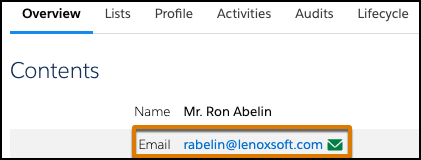
From a prospect record, click the email address.
-
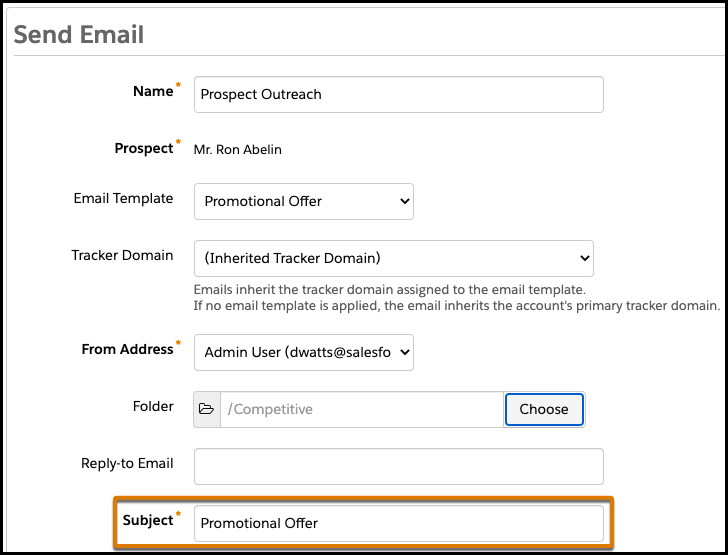
Enter a name for your email for internal reference. The prospect doesn’t see the
name.
-
To use an existing design, select an email template.
-
Choose a campaign. If needed, select a folder and specify an email address to receive
replies.
-
Enter a subject for your email. The subject line is what the prospect sees in their
inbox.
-
Select the email format. An HTML email also includes a plain-text version by
default.
-
Compose your email. To personalize your content, insert merge fields.
-
To get a general idea of how your email looks, click
Preview.
-
Send your email directly to the prospect, or send a test email to an address that you
specify.
Emails sent to prospects appear on the prospect record under Prospect Activities and on
the sent emails list view.