After you set up a marketing app extension, assign it to a business unit, and add an
activity type, it’s time to complete the integration. We recommend working with your developer to
connect the activity types that you created to your third-party app or integration
service.
Required Editions
| Available in: Account Engagement Plus,
Advanced, and Premium
Editions |
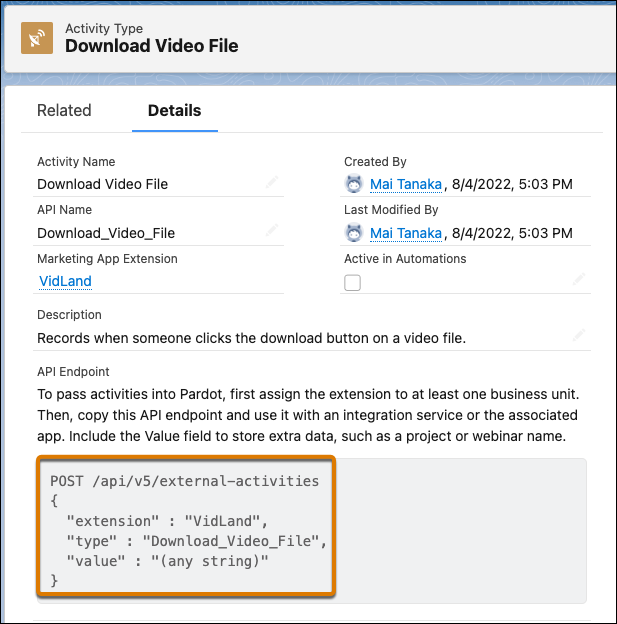
When you save an activity type, Salesforce generates a sample API request. Copy the request and
send it to your developer as a starting point.
Your developer uses the endpoint and field values to finalize the integration with the
third-party application.
Using External Activity Data
After the integration is set up and you
activate your activity, data is passed to Account Engagement. External activity data is
available on the Activities tab on prospect records and you can use it in automation rules,
segmentation rules, and Engagement Studio programs.
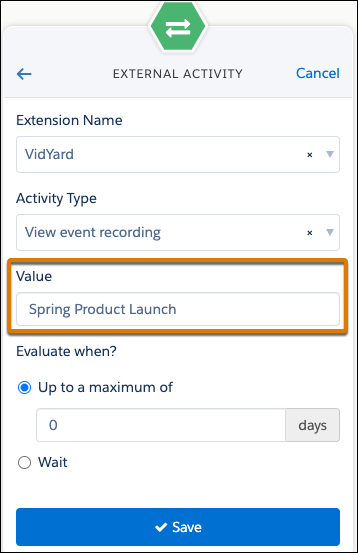
To use external activity data in
automations, the value field must match what’s in the value field for the API integration for
the activity. In this example, the activity type captures each time a prospect views an event
recording and the value field contains the name of the event.
Editing an activity type can impact automations that rely on data from that activity
type. If you deactivate an activity that’s being used in an Engagement Studio program, prospects
skip that step.
External activity data is stored for 36 months from the date it’s passed
to Account Engagement.