Occasionally, a prospect is on several lists that you use to feed engagement programs. To make sure that the prospect receives only the most important emails, use suppression lists to keep them from going through lower-priority programs.
Required Editions
| Available in: All Account Engagement Editions |
Let’s say you have a prospect, Pat Smith, who is on 3 different lists: List A, List B, and List C. You want to send 3 programs: Program 1, Program 2, Program 3. You don't want your overlapping prospects, like Pat Smith, to go through more than one program at a time. Use lists to prioritize your programs and suppress overlapping prospects from receiving the lower-priority program emails.
Program Setup
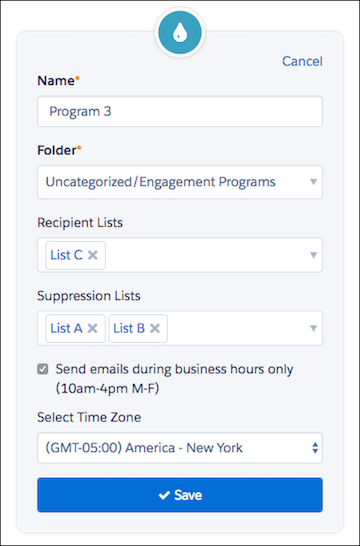
Let's say that Program 1 is your highest-priority program, Program 2 is less important than Program 1, and Program 3 is the least important. You want any prospects that are on List A and List B or List C to receive only Program 1 emails. This table gives an example of how to set up your recipient and suppression lists:
| List | Program 1 | Program 2 | Program 3 |
|---|---|---|---|
| Recipient List | List A | List B | List C |
| Suppression List | None | List A | List A and List B |
In the table, prospects that are on List A are suppressed from receiving Program 2 and Program 3 emails, even if they are on List B or C. Prospects that are on List B and C are suppressed from receiving Program 3 emails.
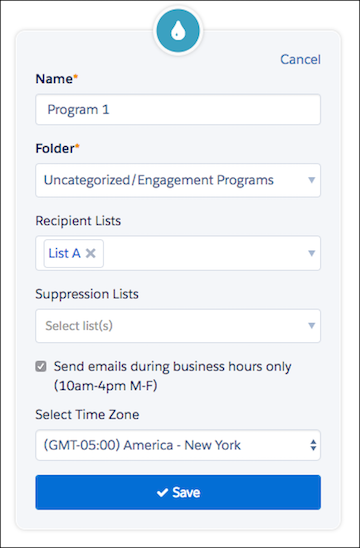
Program 1 uses List A as a recipient list, and doesn’t have any suppression lists.
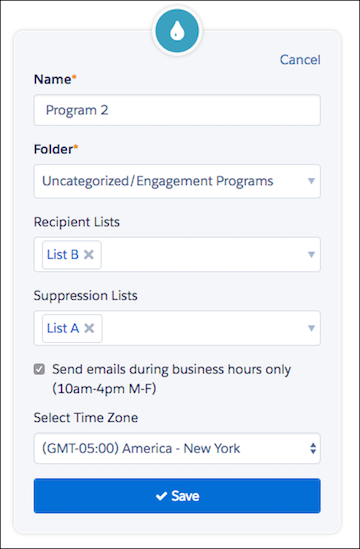
Program 2 uses List B as a recipient list, and uses List A as a suppression list, which keeps prospects on List A from receiving emails from this program.
Program 3 uses List C as a recipient list, and uses both List A and List B as suppression lists, which prevents prospects on List A or B from receiving emails from this program.