
After you segment your audience and finalize the content that drives your marketing, you’re ready to create an engagement program.
Required Editions
| Available in: All Account Engagement Editions |
| User Permissions Needed | |
|---|---|
| To create an engagement program: | Account Engagement Administrator or Marketing role |
-
Open Engagement Studio.
- In Account Engagement, select Marketing and then select Engagement Studio.
- In the Lightning app, select Automations and then Engagement Studio.
- Click + Add Engagement Program.
-
Enter a name for internal use.
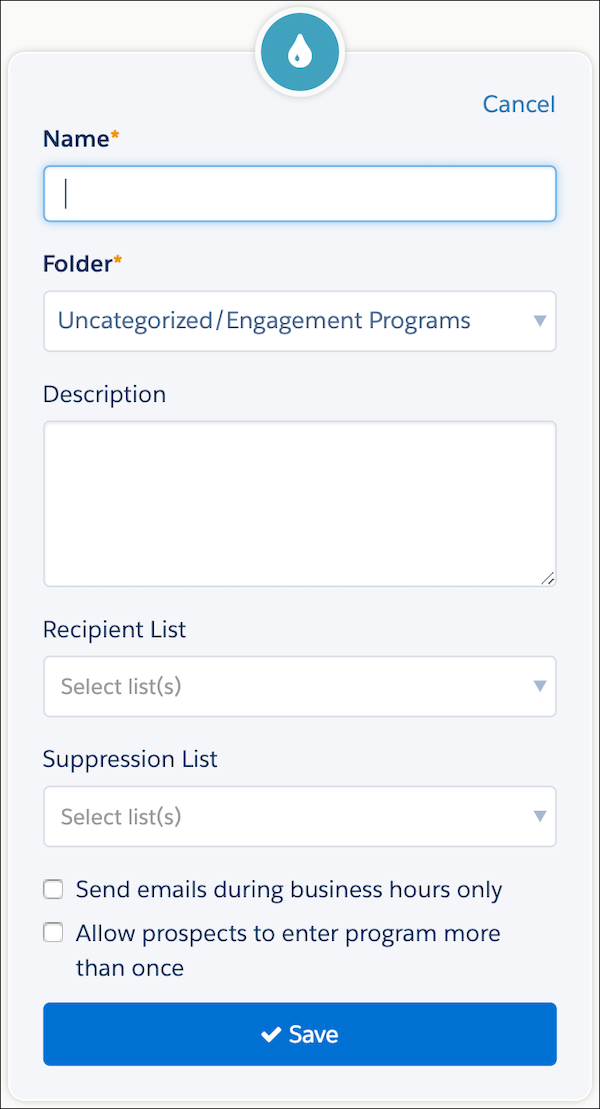
- Choose a folder.
- If needed, enter a description for internal use.
- Click Recipient Lists, and select a list. You can also select a suppression list to exclude from your program.
- Save the program.
After you save your program settings, you’re ready to add steps and build out your prospect paths.