In order to share your dashboard pages and widgets through Slack you need to set up your
Intelligence Reports Insights for Slack Integration in the Setup tab. After you set up the integration you can
track and monitor your campaigns and collaborate with Slack. Slack is permission based, only users
with permissions and access to the business unit or collection can share dashboard pages and
widgets.
Required Editions
| Available in: Intelligence Reports and Intelligence Reports Advanced |
| User Permissions Needed |
| To share dashboard pages and widgets in Slack: |
Access, View & Export, Schedule, Create & Edit |
-
Select the dashboard page or widget that you want to share.
-
Click Share, and then click Slack.
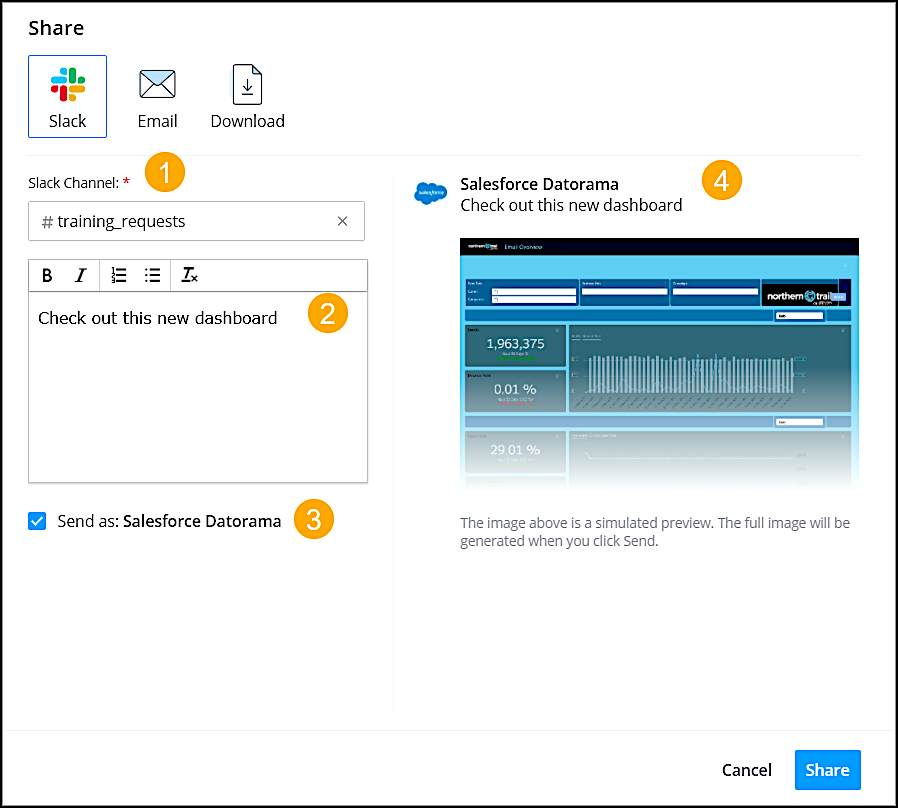
Enter the Slack channel (1), and enter a message that
describes what you’re sharing (2). To send the message with a predefined name, select
Send as (3). This option appears only when defined in the
configuration settings. Preview what you’re sending (4).
-
Click Share.

