You can use the find and replace function to search for a specific measurement. Then,
you can edit and replace the edited measurement across your entire business unit without finding
every location where the calculated measurement is used. This feature is especially useful when
creating a calculated measurement that is meant to replace an existing measurement across your
business unit.
Required Editions
| Available in: Intelligence Reports Advanced |
| User Permissions Needed |
| To Find and Replace a Calculated Measurement: |
Create & Edit |
-
From Analytics Builder, select Intelligence [Datorama] Reports.
-
Select the Setup tab.
-
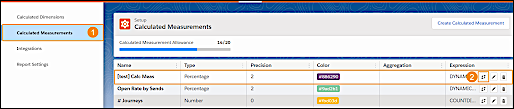
Expand Calculated Measurement (1), and then select a calculated
measurement from the table.
-
Click the Find and Replace icon (2).
-
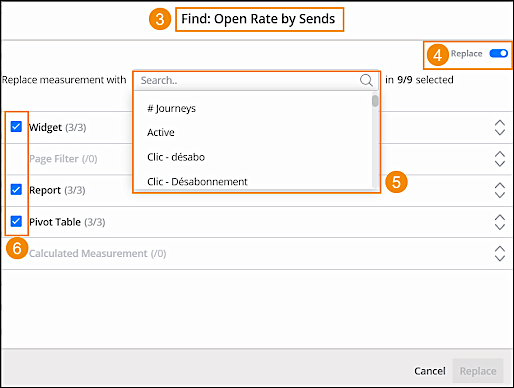
In the Find & Replace window (3), you can see where the selected
calculated measurement is used across your business unit. For example, widgets, reports, or
pivot tables.
-
Toggle on the Replace feature (4).
-
From the dropdown, select the measurement that you want to replace the current calculated
measurement with (5).
-
You can uncheck any location that you don’t want to replace. For example, uncheck a
specific widget or report (6).
-
Click Replace.