---
schema_version: "1"
id: c71c4af1ecf23eacde46f31c869c1648aeeb34aaf715ea8ae8718ef39f4ef48a
title: Find and Replace Calculated Measurements
collection: admin
version: current
locale: en-us
portal_url: https://docs.salesforce.com/admin/current/en-us/mktg/264-0-0/mc_dat_setup_meas_mgmt_find.md
canonical_url: https://help.salesforce.com/s/articleView?id=mktg.mc_dat_setup_meas_mgmt_find.htm&release=264.0.0&type=5
source_site: help.salesforce.com
content_type: documentation
content_hash: 418d40a68c37513ab29bc530289af3ea8988f35a807b0934e08b18ed53599f92
description: You can use the find and replace function to search for a specific measurement. Then, you can edit and replace the edited measurement across your entire business unit without finding every location where the calculated measurement is used. This feature is especially useful when creating a calculated measurement that is meant to replace an existing measurement across your business unit.
products:
- Marketing
- Marketing Cloud Intelligence
release: "264"
---
# Find and Replace Calculated Measurements
You can use the find and replace function to search for a specific measurement. Then, you can edit and replace the edited measurement across your entire business unit without finding every location where the calculated measurement is used. This feature is especially useful when creating a calculated measurement that is meant to replace an existing measurement across your business unit.
### Required Editions
Available in: Intelligence Reports Advanced
User Permissions Needed
To Find and Replace a Calculated Measurement:
Create & Edit
1. From Analytics Builder, select **Intelligence \[Datorama\] Reports**.
2. Select the **Setup** tab.
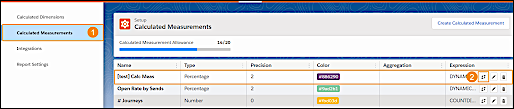
3. Expand **Calculated Measurement** (1), and then select a calculated measurement from the table.
4. Click the **Find and Replace** icon (2).
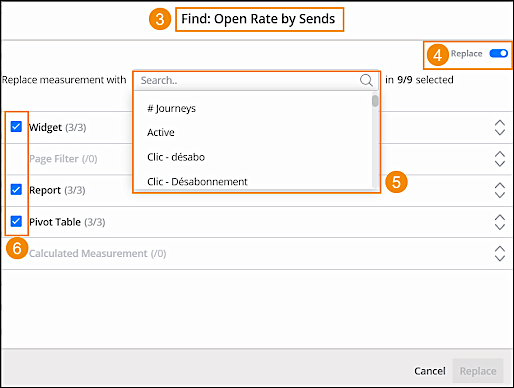
5. In the **Find & Replace** window (3), you can see where the selected calculated measurement is used across your business unit. For example, widgets, reports, or pivot tables.
6. Toggle on the **Replace** feature (4).
7. From the dropdown, select the measurement that you want to replace the current calculated measurement with (5).
8. You can uncheck any location that you don’t want to replace. For example, uncheck a specific widget or report (6).
9. Click **Replace**.