Create queries automatically based on selected dimensions and measurements with
clicks-no-code. You can also use or modify one of the predefined queries in the Query Library.
They represent commonly used queries in Query Builder and SQL formats.
Required Editions
| Available in: Intelligence Reports Advanced |
| User Permissions Needed |
| To use the Query Builder: |
Create & Edit |
-
On the Queries tab, click Create New Query.
-
Name your query.
-
Select Builder, and click Create.
-
Build your query.
-
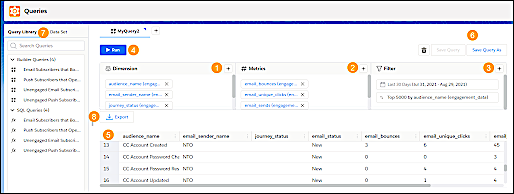
Click the + icons to add the dimensions (1), metrics (2), and
filters (3).
-
Run your query (4), and view the query results (5).
-
You can save your query (6) and view it later in the Query Library (7).
-
You can download or export your query results (8) and perform scheduled exports on saved
queries.