---
schema_version: "1"
id: 2a5572a969a96e0082a724533db1be295b8206ca70c489a75cb3befb3a58a16d
title: Query Your Data with Query Builder
collection: admin
version: current
locale: en-us
portal_url: https://docs.salesforce.com/admin/current/en-us/mktg/264-0-0/mc_dat_queries_builder.md
canonical_url: https://help.salesforce.com/s/articleView?id=mktg.mc_dat_queries_builder.htm&release=264.0.0&type=5
source_site: help.salesforce.com
content_type: documentation
content_hash: a25d020de55e1e5322a0463edd0e824b0b476dc352793834b92abb980d6cb86b
description: Create queries automatically based on selected dimensions and measurements with clicks-no-code. You can also use or modify one of the predefined queries in the Query Library. They represent commonly used queries in Query Builder and SQL formats.
products:
- Marketing
- Marketing Cloud Intelligence
release: "264"
---
# Query Your Data with Query Builder
Create queries automatically based on selected dimensions and measurements with clicks-no-code. You can also use or modify one of the predefined queries in the Query Library. They represent commonly used queries in Query Builder and SQL formats.
### Required Editions
Available in: Intelligence Reports Advanced
User Permissions Needed
To use the Query Builder:
Create & Edit
1. On the **Queries** tab, click **Create New Query**.
2. Name your query.
3. Select **Builder**, and click **Create**.
4. Build your query.
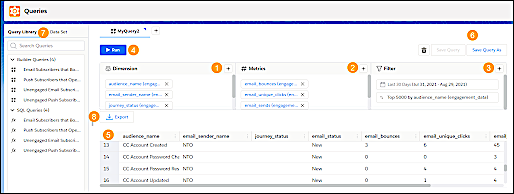
1. Click the **+** icons to add the dimensions (1), metrics (2), and filters (3).
2. Run your query (4), and view the query results (5).
3. You can save your query (6) and view it later in the Query Library (7).
4. You can download or export your query results (8) and perform scheduled exports on saved queries.