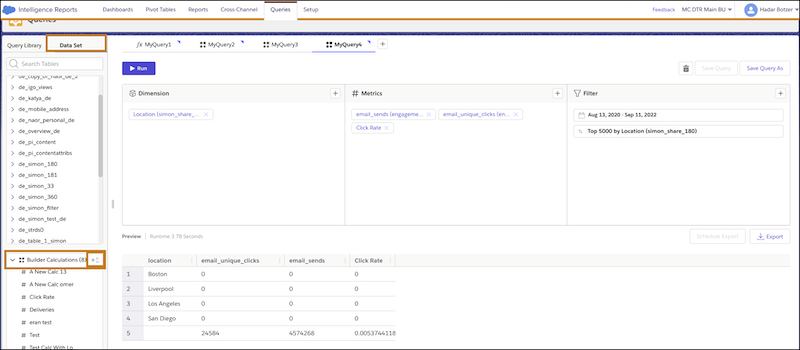
Use a builder calculation to create a custom measurement when you have subscriber-level
data and you want more information, such as click rates or open rates. For example, you have
geographical location data and you want to see the click rate per city.
Required Editions
| Available in: Intelligence Reports Advanced |
| User Permissions Needed |
| To create a builder calculation: |
Create & Edit |
-
On the Queries tab, click Create New Query.
-
Name your query.
-
Select Builder, and click Create.
-
On the left side, click the Data Set tab.
-
To add a builder calculation, under Builder Calculations, click the
plus sign.
-
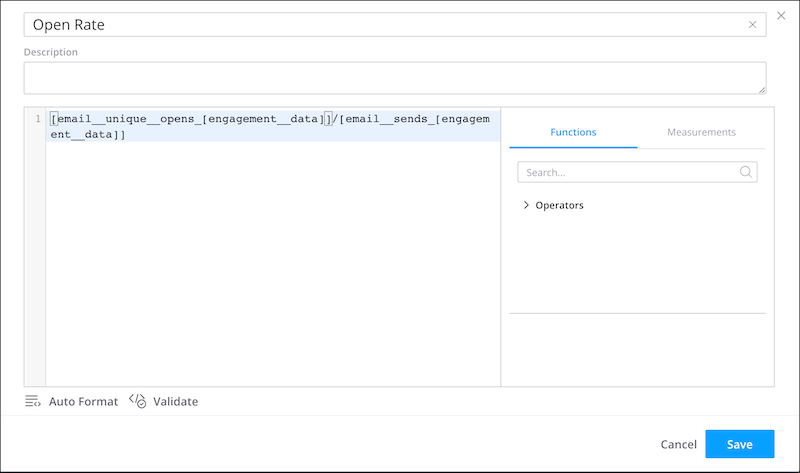
Name the measurement, and add an optional description.
-
Enter the logic. Here’s an example of an open rate measurement.
-
Save your work.
-
To use the builder calculation in your query, on the Measurements
tab, click the plus sign.
-
From Builder Calculations, select the measurement.
-
Run your query.