---
schema_version: "1"
id: 46c0635fc83c1dfddc6d2142c80334c021c59d5e85bad44df3460e3572f4984a
title: Create a Builder Calculation
collection: admin
version: current
locale: en-us
portal_url: https://docs.salesforce.com/admin/current/en-us/mktg/264-0-0/mc_dat_builder_cacluations_create.md
canonical_url: https://help.salesforce.com/s/articleView?id=mktg.mc_dat_builder_cacluations_create.htm&release=264.0.0&type=5
source_site: help.salesforce.com
content_type: documentation
content_hash: dbb5f6a69aace9324c7f1bd936c9a13fce59f13a081cbdfd3472dd11e4a99783
description: Use a builder calculation to create a custom measurement when you have subscriber-level data and you want more information, such as click rates or open rates. For example, you have geographical location data and you want to see the click rate per city.
products:
- Marketing
- Marketing Cloud Intelligence
release: "264"
---
# Create a Builder Calculation
Use a builder calculation to create a custom measurement when you have subscriber-level data and you want more information, such as click rates or open rates. For example, you have geographical location data and you want to see the click rate per city.
### Required Editions
Available in: Intelligence Reports Advanced
User Permissions Needed
To create a builder calculation:
Create & Edit
1. On the Queries tab, click **Create New Query**.
2. Name your query.
3. Select **Builder**, and click **Create**.
4. On the left side, click the **Data Set** tab.
5. To add a builder calculation, under **Builder Calculations**, click the plus sign.
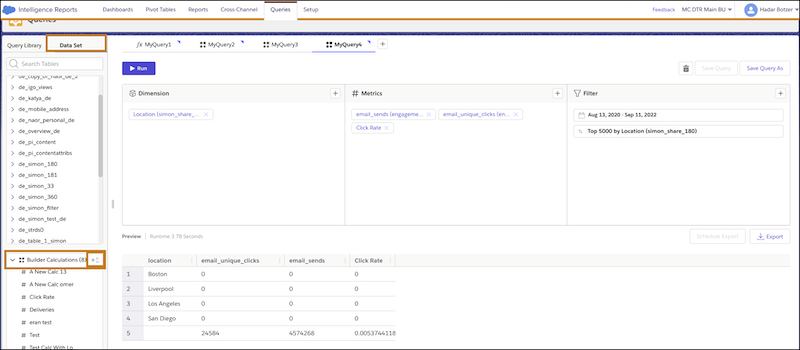
6. Name the measurement, and add an optional description.
7. Enter the logic. Here’s an example of an open rate measurement.
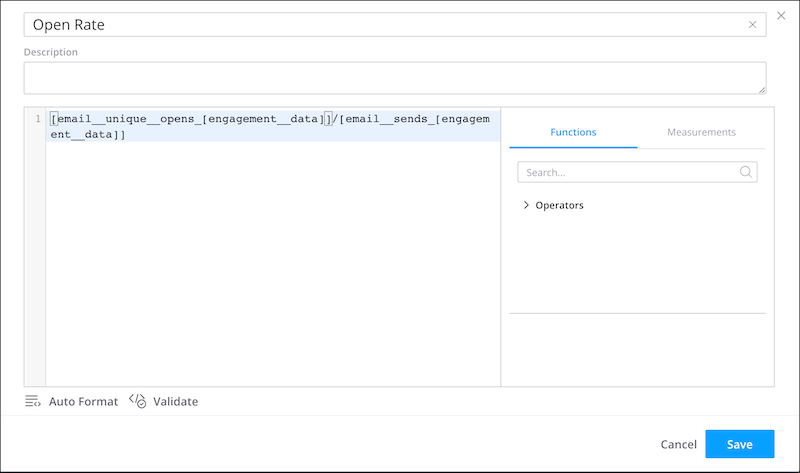
8. Save your work.
9. To use the builder calculation in your query, on the **Measurements** tab, click the plus sign.
10. From **Builder Calculations**, select the measurement.
11. Run your query.
#### See Also
- [Click Rate Builder Calculation Example](https://help.salesforce.com/s/articleView?id=mktg.mc_dat_builder_calculations_example.htm&release=264.0.0&type=5 "Use this example to see how data is pulled from connected data extensions (regions) and engagement data (sends, bounces, and clicks).")