
Use the Lead Generation app to see a complete view of lead generation data.
Required Editions
| User Permissions Needed | |
|---|---|
| To run Marketplace apps | Admin, Power User, or Viewer |
- In Marketing Cloud Intelligence, on the Marketplace tab, select Apps.
- Click Installed Solutions, and then select the Lead Generation app.
- Filter the page by lead status, lead source, and lead creation data.
- Toggle between the two tabs: Lead Pipeline Overview and Lead to Opportunity.
-
In the Lead Pipeline Overview, monitor your lead generation data:
Leads Created QOQ Compares the number of leads from last quarter to this quarter. Leads Created MOM Compares the number of leads from last month to this month. Leads Created WOW Compares the number of leads from last week to this week. Lead Creation by Quarter A detailed view of leads per quarter. Lead Creation by Month A detailed view of leads per month. Lead Exploration Top 6 A list of the top 6 leads. To change the data, filter by lead source, status, and owner. Lead Status Funnel Shows the leads per status, according to how you defined the funnel statuses during setup. To view the lead names, click a status. Lead Exploration Shows all the leads broken down by different dimensions. For example, per month and per lead status. Clear any of the leads you don't want to view on the right-hand side of the graph. -
In the Lead to Opportunity tab, review your conversions, and see how
they performed during the Leads to Sales Funnel. See which channels
provide faster conversions, and explore your Opportunities.
 Note To see this view, click Convert Lead. If you don’t use it, Salesforce can’t create a connection between a lead and opportunity.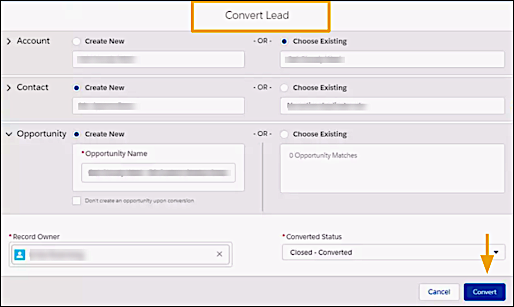
Overall Leads Created The total number of leads created in the account. Leads Converted to Contact The total number of leads converted into contacts. Leads Converted to Opportunities The total number of leads converted into opportunities. Leads to Sales Funnel All the leads that led to sales by channel. To view exact numbers and dates, click a channel. Lead to Opportunity Cohort Analysis A breakdown of Lead Creation Date or Lead Source divided into time periods. Opportunity Exploration All the opportunities broken down by different dimensions. For example, view lead creation quarters broken down by different opportunity stages.