
Use the Marketing Insights for Sales Cloud app to review your marketing efforts and spend and how they convert into revenue.
| REQUIRED USER ROLE | |
|---|---|
| To run Marketplace apps | Admins, Power Users, or Viewers |
- In Marketing Cloud Intelligence, on the Marketplace tab, select Apps.
- Click Installed Solutions, and then select the Marketing Insights for Sales Cloud app.
-
Click the Customer Acquisition tab to get a high-level view of your
campaign’s performance.
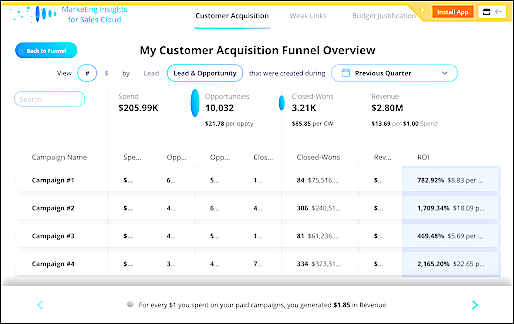
It shows a part of your sales funnel and how your spend and revenue are doing in correlation to it. It also displays the conversion rate between opportunities and closed-wons and the average time it took, in weeks, for an opportunity to convert to a closed-won.
-
Click the Weak Links tab to see the weak points within your sales
funnel.
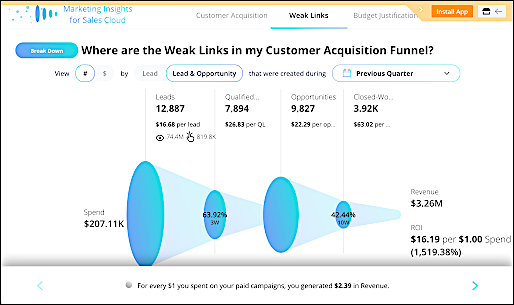
It shows the conversion rates of the different stages in your funnel and the average time it takes for a lead to move to the next step.
-
Click the Budget Justification tab to help you justify the
allocation of your budget to your stakeholders and to yourself.
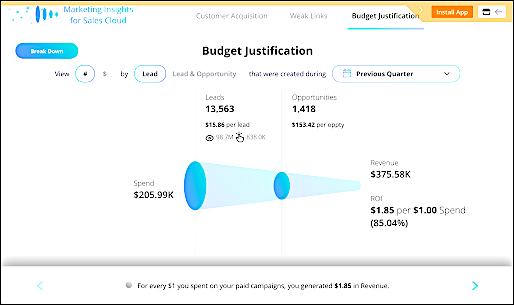
The funnel indicates how much spend went in and how it converted throughout the cycle to leads, opportunities, revenue, and ROI. You can also see the cost per lead and the cost per opportunity.
The Cost Per Lead, Closed-Won Rate, and ROI columns are three critical elements in recognizing whether a campaign was successful. For example, a campaign that uses 40% of your budget has a low cost per lead, high closed-won rate, and a high ROI.