
Connect your ecommerce, marketing, and web analytics platforms with the Ecommerce Marketing Insights app. You can connect to data streams in your workspace or add new ones. You can use the existing API connectors or ingest your data as a TotalConnect data stream.
Required Editions
| User Permissions Needed | |
|---|---|
| To install Marketplace apps: | Admin |
Ecommerce Marketing Insights supports:
- Amazon Vendor, Amazon Seller Central, Amazon Vendor Brand Analytics, Salesforce B2C, and Salesforce Order Management ecommerce platforms
- All marketing ads platforms
- Google Analytics for web analytics
Before you begin
You must have credentials to at least one ecommerce platform, and one marketing platform.
-
Install the Ecommerce Marketing Insights app.
- In Marketing Cloud Intelligence, on the Marketplace tab, select Apps.
- Select the app, and click Get it Now.
- Click Start.
-
Choose which ecommerce platforms you want the app to connect to.
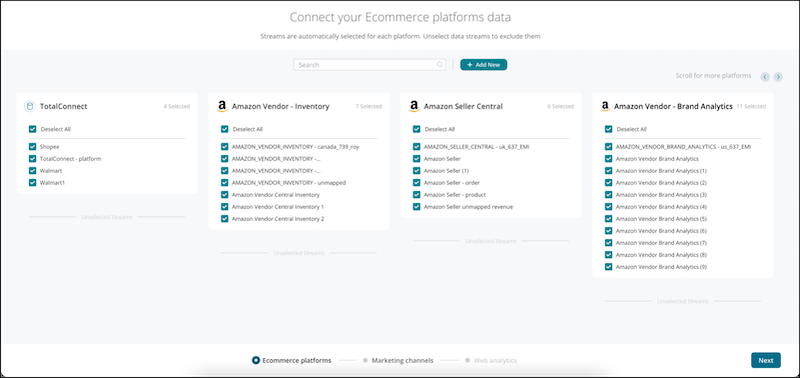
- Deselect the data streams that you don’t want to connect to.
-
If you want to create a data stream, click Add New.
All available platforms appear. The new data stream is also added to your workspace and affects your workspace total row usage.
- Select a platform.
-
Enter your login details. For example, if you select Amazon Seller Central, select the
Amazon user and profile.
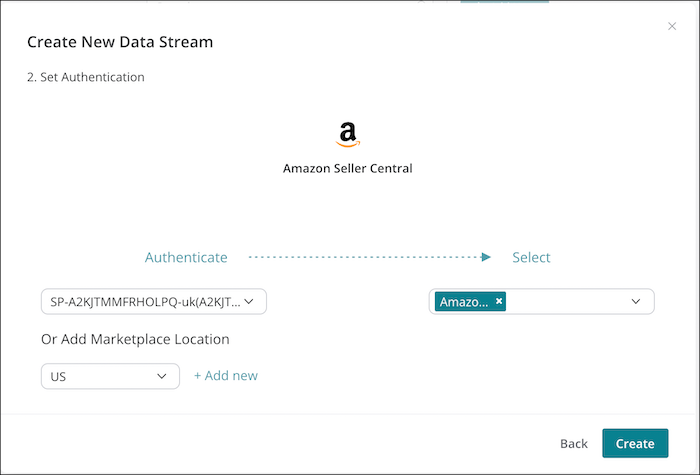
- Click Create.
-
Connect your marketing platforms.
- Deselect the data streams that you don’t want the app to connect to.
- If you want to create a data stream, click Add New.
- Click Next.
-
(Optional) Connect your web analytics platforms. If you choose not to connect to web
analytics data, you can’t see all the insights when opening the app.
- Deselect the data streams that you don’t want the app to connect to.
- If you want to create a data stream, click Add New.
- Click Install.