
See which ecommerce platforms are generating the most revenue, and discover trends so that you can adjust as needed.
Required Editions
| User Permissions Needed | |
|---|---|
| To view installed Marketplace apps: | Admins, Power Users, and Viewers |
Installing the Ecommerce Marketing Insights app creates a collection with two complementary visualizations: the Ecommerce Marketing Insights collection with two dashboard pages and the Marketing Insights app page available in run mode.
If your data stream wasn’t mapped correctly and is missing the TotalOrderRevenue or MediaCost fields, you must map them. For more information, see Modify Ecommerce Marketing Insights Settings
- In Marketing Cloud Intelligence, on the Marketplace tab, select Apps.
- Click Installed Solutions, and select the Ecommerce Marketing Insights app.
-
To change the dates, use the calendar picker at the top of the page. By default, the KPIs
Overview tab appears.
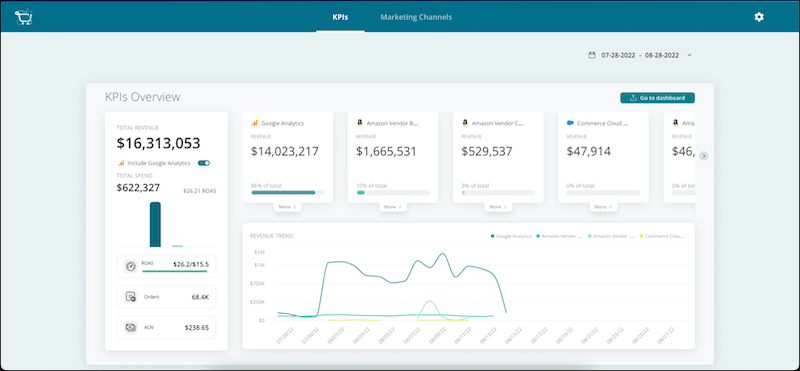 View your total revenue and spend to understand your ROAS (Rate Over Ad Spend) and other KPIs. See which platforms performed better, and view trends over time.
 -
To view a detailed analysis of your marketing channel data, select the Marketing
Channels tab.
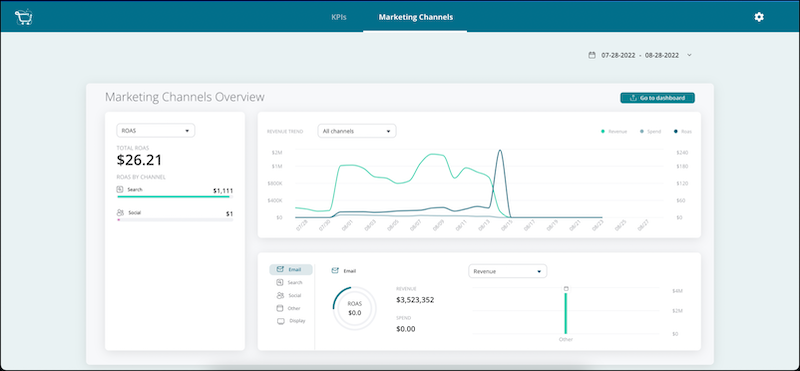 View all your marketing channels and their performance. Change the KPI, and view different breakdowns using ROAS, revenue, or spend metrics. View details per channel. When you change the channel, the widgets change accordingly.
 - To view the accompanying dashboard or view more details, click Go to Dashboard or move to the Visualize tab.