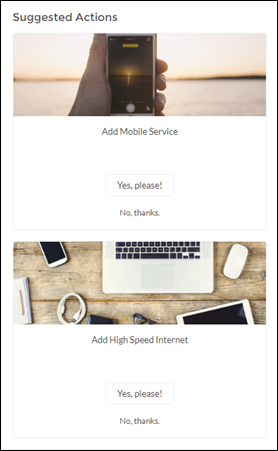
Suggested Actions brings the power of Einstein Next Best Action into sites. Choose strategies that apply your org’s business rules to display suggested offers and actions.
Required Editions
| User Permissions Needed | |
|---|---|
| To create an Experience Cloud site: | Create and Set Up Experiences AND View Setup and Configuration |
| To customize an Experience Cloud site: |
|
| To publish an Experience Cloud site: |
|
| To run a suggested action in an Experience Builder site: |
Run Flows OR Flow User field enabled on the user detail page OR If Override default behavior and restrict access to enabled profiles or permission sets is selected for an individual flow, access to that flow is given to users by profile or permission set |
| To view Einstein Next Best Action Reccomendation records when using Flow Builder as the reccomendation source in an Experience Cloud site: |
|
- Create a recommendation strategy in the Flow Builder.
- Drag the Suggested Actions component onto your site page.
- In the property editor, enter the title that you want customers to see (1) and
select the strategy you want to display (2). Enter the maximum number of
suggestions to display (3) and choose where the suggested actions open
(4).
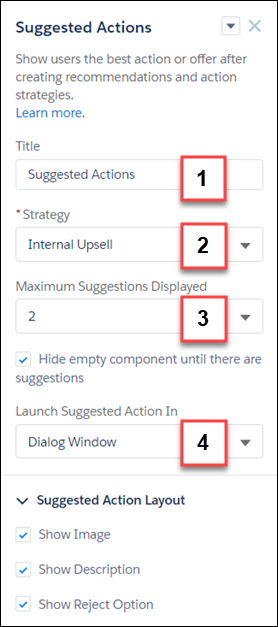
- Title—Displays this title for the component on the site page. The default title is Next Best Action.
- Strategy—Displays all available strategies created in Flow Builder.
- Maximum Suggestions Displayed—Allows up to four suggestions to display when there are multiple suggested actions available.
- Hide Empty Component—Hides the component when there are no suggested actions initially available. If there are actions available when the app opens, the component continues to display, even if the actions run out.
- Launch Suggested Actions In—Specifies whether your suggestions open in a display window, a new browser window, or on a site flow page.
- Show Image—Shows images associated with each suggested action. If the recommendation doesn’t have an image, a placeholder displays.
- Show Description—Displays the description defined on the Recommendation record.
- Show Reject Option—Displays the reject option associated with suggested actions.

Example Here’s how a strategy looks when it displays in a site.