
Use the Orchestration Work Guide component so credentialed site visitors can complete the work items that they’re assigned.
Required Editions
| Available in: Lightning Experience. |
| Available in: Enterprise, Performance, Unlimited, and Developer editions. |
| User Permissions Needed | |
|---|---|
| To create an Experience Cloud site: | Create and Set Up Experiences AND View Setup and Configuration |
| To customize an Experience Cloud site: |
|
| To publish an Experience Cloud site: |
|
| To run a flow in an Experience Builder site | Run Flows |
- Build an orchestration or flow approval process in Flow Builder with at least one step assigned to a credentialed site visitor.
- Activate the flow.
-
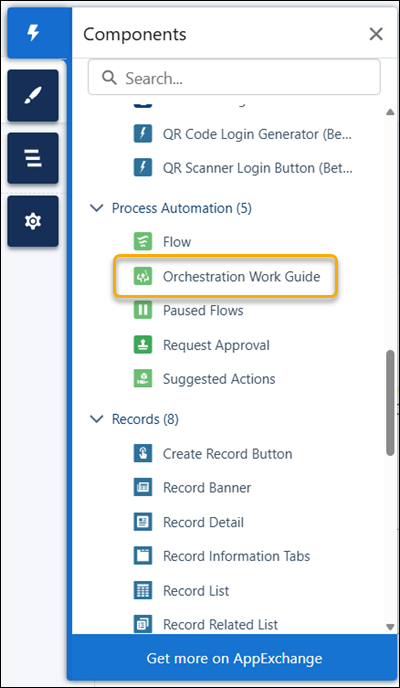
Drag the Orchestration Work Guide component into position on an object detail page in
your site.
-
Configure the component to affect how it appears to site visitors.
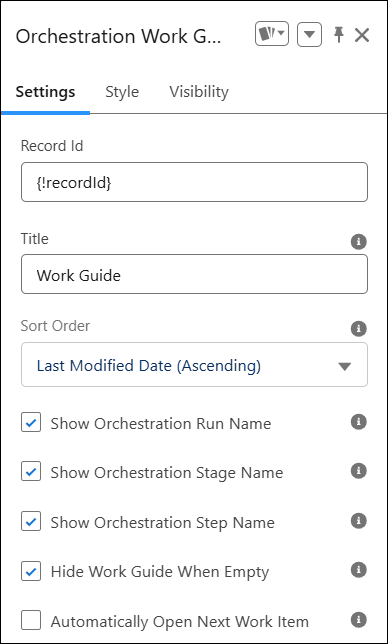
 Important The Record ID is set automatically. Don’t change the field value.
By default, the component shows a refreshed list of work items after a user completes a work item. To open the next work item from the same orchestration run instead, select Automatically Open Next Work Item.
 Tip Changes you make don’t affect how the component appears in Experience Builder.

Example
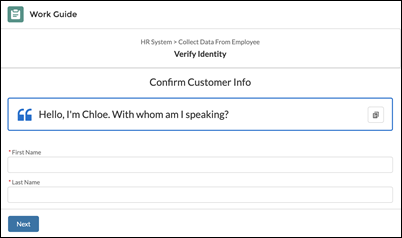
Sample Orchestration Work Guide component.