Experience Builder sites in your production org use the Content
Snapshot service to generate SEO optimized HTML for web crawlers such as Googlebot, and
content sharing platforms such as Facebook. The concept is common to single-page application
frameworks known as dynamic rendering. Salesforce takes a snapshot when you make changes to
your site’s publicly available content. This functionality works well for most updates. But
let’s say you update a page with time-sensitive information, such as price changes for a flash
sale. Instead of waiting, you can take a manual snapshot once every 24 hours to refresh the
page content served to search engines.
Required Editions
| Available in: Salesforce Classic and Lightning Experience |
| Available in: Enterprise, Performance, and Unlimited
Editions. This feature isn’t supported in Government Cloud. |
| Applies to: LWR and
Aura sites |
| User Permissions
Needed |
| To customize or publish an Experience Cloud site: |
- Create and Set Up Experiences AND View Setup and Configuration AND be a member
of the site
OR
- View Setup and Configuration AND be a member of the site AND have appropriate
role-based site access
|
A content snapshot is generated and served in production for every route included in your
standard sitemap for all site languages added to
your site. A snapshot includes views produced with the standard language parameter and
record detail pages where the guest user has read access to one or more records. We don't
recommend producing different content based on your own query string parameters because
snapshots aren’t supported for permutations of your own parameters.
-
In Experience Builder, update the page’s content, and then publish your site to make
your changes live.
You can only take snapshots of published pages.
-
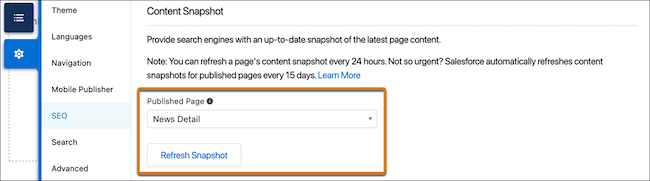
On the SEO settings tab, select the page in the Published Page dropdown.
-
Click Refresh Snapshot.
Manual snapshots are processed as quickly as possible, but your updates can take some
time to appear in search results. If you request manual snapshot refreshes for a large volume
of pages simultaneously, your snapshots won’t all be updated at the same time.