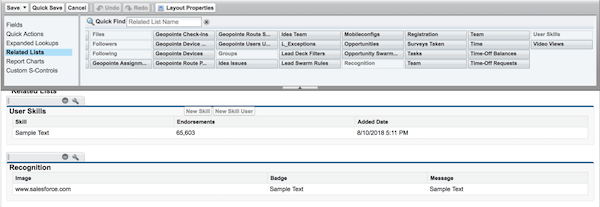
Edit the user profile layout to display the full list of assigned recognition badges on
a members’ profile page.
Required Editions
| Available in: Enterprise, Professional, Unlimited, and
Developer editions.
|
| User Permissions Needed |
| To update the user profile layout: |
Customize Application |
-
From Setup, go to Users under Customize.
Select Page Layouts.
-
Click Edit next to User Profile Layout.
-
Click Related Lists and drag Recognition to
the Related Lists section of the page layout.
-
Click Save.
-
Each site’s guest users have a discrete user profile. To find out which user profile layout
to update, go to Experience Builder in
the site you’re working on.
-
Click Settings and select the link to the guest user profile.
-
Repeat steps 1–4 for that user profile layout.