---
schema_version: "1"
id: 7213e1d70b096ebcc2be91e702ad0f8f5521d0151b0449749f6791a06793b819
title: Display the Full List of Assigned Recognition Badges on a Member’s Profile Page
collection: admin
version: current
locale: en-us
portal_url: https://docs.salesforce.com/admin/current/en-us/experience/264-0-0/networks_recog_badges_user_profile_layout.md
canonical_url: https://help.salesforce.com/s/articleView?id=experience.networks_recog_badges_user_profile_layout.htm&release=264.0.0&type=5
source_site: help.salesforce.com
content_type: documentation
content_hash: c4ae20a14a80f7e8ab6164269cf23459dfd6239c5e258babc821ea2e2112a655
description: Edit the user profile layout to display the full list of assigned recognition badges on a members’ profile page.
products:
- Experiences
release: "264"
---
# Display the Full List of Assigned Recognition Badges on a Member’s Profile Page
Edit the user profile layout to display the full list of assigned recognition badges on a members’ profile page.
### Required Editions
Available in: Enterprise, Professional, Unlimited, and Developer editions.
User Permissions Needed
To update the user profile layout:
Customize Application
1. From Setup, go to **Users** under **Customize**. Select **Page Layouts**.
2. Click **Edit** next to User Profile Layout.
3. Click **Related Lists** and drag **Recognition** to the Related Lists section of the page layout.
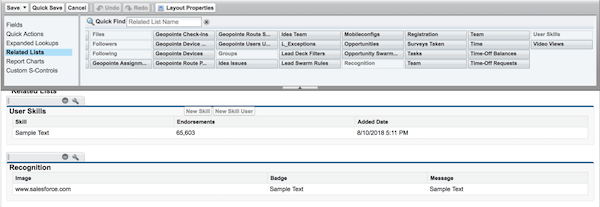
4. Click **Save**.
5. Each site’s guest users have a discrete user profile. To find out which user profile layout to update, go to Experience Builder in the site you’re working on.
6. Click **Settings** and select the link to the guest user profile.
7. Repeat steps 1–4 for that user profile layout.