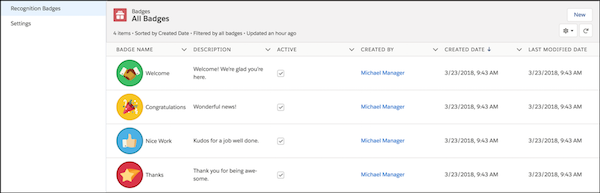
Turn on Recognition Badges via the Gamification Tile to finish setting up and start giving badges.
Required Editions
| Available in: Enterprise, Professional, Unlimited, and Developer editions. |
| User Permissions Needed | |
|---|---|
| To turn on or off Recognition Badges: |
Create and Set Up Experiences AND Moderate Chatter |
Before completing this task, enable WDC’s Thanks feature, configure permission sets for who can create and give badges, and add recognition to user profile layouts.
- In Experience Workspaces, click the Gamification tile.
- In Settings, turn on Recognition Badges. A Recognition Badges section appears above Settings.
-
To see the available badges and create and manage badges, click Recognition
Badges.