---
schema_version: "1"
id: 9c479c74caebc86a948e733db2aa652a7438e42b0f6db47927038fd8edb9b7d8
title: Turn On Recognition Badges in Experience Workspaces
collection: admin
version: current
locale: en-us
portal_url: https://docs.salesforce.com/admin/current/en-us/experience/264-0-0/networks_recog_badges_turn_on.md
canonical_url: https://help.salesforce.com/s/articleView?id=experience.networks_recog_badges_turn_on.htm&release=264.0.0&type=5
source_site: help.salesforce.com
content_type: documentation
content_hash: b7f589350ab7fb76fcf31ae92b94a3148078e754a73e682a41ed2435f8ef407b
description: Turn on Recognition Badges via the Gamification Tile to finish setting up and start giving badges.
products:
- Experiences
release: "264"
---
# Turn On Recognition Badges in Experience Workspaces
Turn on Recognition Badges via the Gamification Tile to finish setting up and start giving badges.
### Required Editions
Available in: Enterprise, Professional, Unlimited, and Developer editions.
User Permissions Needed
To turn on or off Recognition Badges:
Create and Set Up Experiences
AND
Moderate Chatter
Before completing this task, enable WDC’s Thanks feature, configure permission sets for who can create and give badges, and add recognition to user profile layouts.
1. In Experience Workspaces, click the Gamification tile.
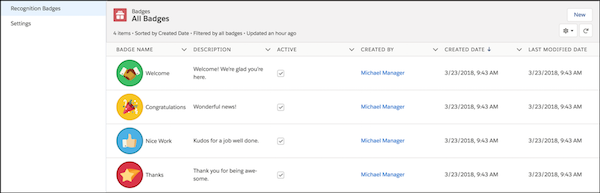
2. In **Settings**, turn on Recognition Badges. A Recognition Badges section appears above **Settings**.
3. To see the available badges and create and manage badges, click **Recognition Badges**.