
Generate a Manual Sitemap Refresh for Your Experience Builder Site
When you go live with a new Experience Builder site or make significant updates to an existing one, you can generate a manual sitemap one time every 24 hours outside of the weekly automatic sitemap refresh.
Required Editions
| Available in: Salesforce Classic and Lightning Experience |
| Available in: Enterprise, Performance, and Unlimited Editions |
| Applies to: LWR and Aura sites |
| User Permissions Needed | |
|---|---|
| To customize or publish an Experience Cloud site: |
|
To initiate a manual refresh of your sitemap one time every 24 hours:
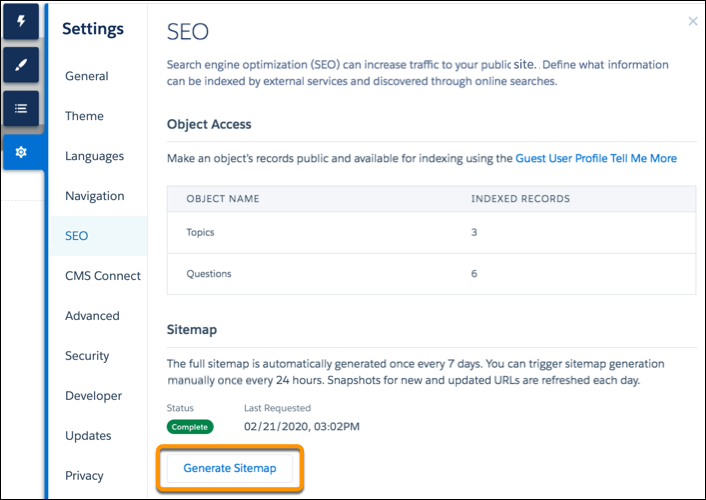
- In Experience Builder, navigate to the SEO tab in settings.
-
Click the Generate Sitemap button to manually generate a sitemap for
your site.
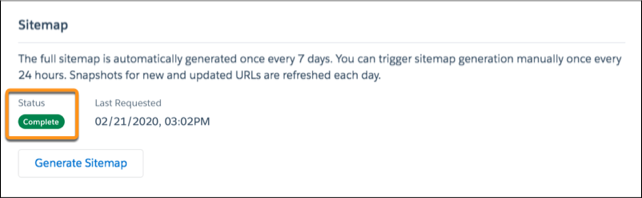
- Track the status of the sitemap as it processes.

When you add new pages to your site, these links are included in an automatic partial sitemap refresh every 24 hours. If you add new pages after you manually generate a sitemap, they’re added to the sitemap automatically.