---
schema_version: "1"
id: 7ba7cc80800e4c81536c05cd2e4fcb8f75d554e8a0d9ebb5ebdfa82f8d81a75e
title: Generate a Manual Sitemap Refresh for Your Experience Builder Site
collection: admin
version: current
locale: en-us
portal_url: https://docs.salesforce.com/admin/current/en-us/experience/264-0-0/networks_manual_SEO_sitemap.md
canonical_url: https://help.salesforce.com/s/articleView?id=experience.networks_manual_SEO_sitemap.htm&release=264.0.0&type=5
source_site: help.salesforce.com
content_type: documentation
content_hash: 0a6ba2218bc1a0cae5ca2c16083c99018709bf73d4cc7d72910e26777e4c4921
description: When you go live with a new Experience Builder site or make significant updates to an existing one, you can generate a manual sitemap one time every 24 hours outside of the weekly automatic sitemap refresh.
products:
- Experiences
release: "264"
---
# Generate a Manual Sitemap Refresh for Your Experience Builder Site
When you go live with a new Experience Builder site or make significant updates to an existing one, you can generate a manual sitemap one time every 24 hours outside of the weekly automatic sitemap refresh.
### Required Editions
Available in: Salesforce Classic and Lightning Experience
Available in: Enterprise, Performance, and Unlimited Editions
Create and Set Up Experiences AND View Setup and Configuration AND be a member
of the site
OR
View Setup and Configuration AND be a member of the site AND have appropriate
role-based site access
To initiate a manual refresh of your sitemap one time every 24 hours:
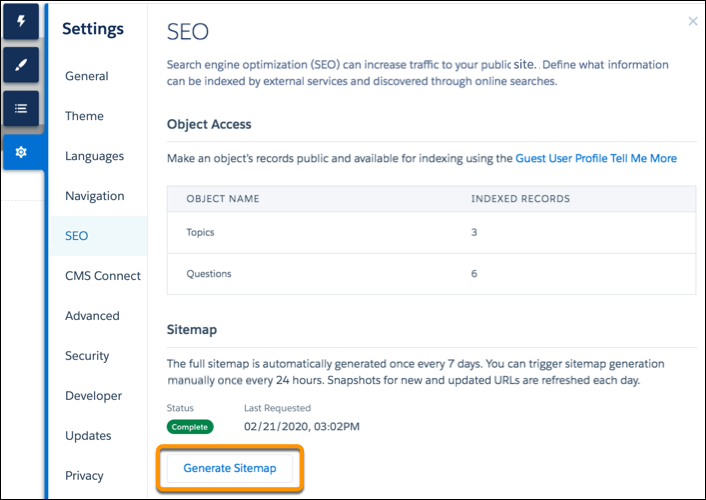
1. In Experience Builder, navigate to the SEO tab in settings.
2. Click the **Generate Sitemap** button to manually generate a sitemap for your site.
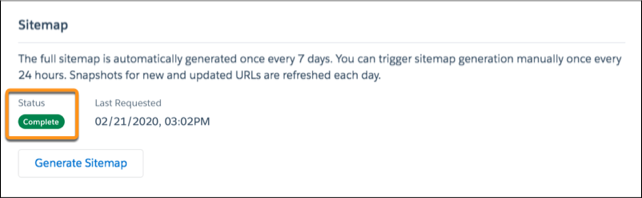
3. Track the status of the sitemap as it processes.
The status bar shows In Progress while the sitemap generates. After your sitemap is generated, the status updates to read Complete.

Tip For the best experience, generate a manual sitemap during off-peak hours.
When you add new pages to your site, these links are included in an automatic partial sitemap refresh every 24 hours. If you add new pages after you manually generate a sitemap, they’re added to the sitemap automatically.
#### See Also
- [Provide Search Engines with Fresh Content Snapshots](https://help.salesforce.com/s/articleView?id=experience.networks_seo_snapshot.htm&release=264.0.0&type=5 "Experience Builder sites in your production org use the Content Snapshot service to generate SEO optimized HTML for web crawlers such as Googlebot, and content sharing platforms such as Facebook. The concept is common to single-page application frameworks known as dynamic rendering. Salesforce takes a snapshot when you make changes to your site’s publicly available content. This functionality works well for most updates. But let’s say you update a page with time-sensitive information, such as price changes for a flash sale. Instead of waiting, you can take a manual snapshot once every 24 hours to refresh the page content served to search engines.")
- [Create a Custom robots.txt File for Your Experience Builder Site](https://help.salesforce.com/s/articleView?id=experience.networks_seo_configure.htm&release=264.0.0&type=5 "The robots.txt file for your site is automatically generated. It allows search engines to crawl your entire site. However, if you want to tell search engines not to crawl certain pages of your public site, you can create a custom robots.txt file.")
- [Configure a Custom Domain for Your Experience Cloud Site](https://help.salesforce.com/s/articleView?id=experience.networks_custom_domain.htm&release=264.0.0&type=5 "To provide a branded experience for users who access your external-facing Salesforce content, serve your Experience Cloud sites on a domain that you own. With a custom domain, your users access your external-facing Experience Cloud site and its functionality through your branded URL, such as https://www.example.com. Also, with the many-to-many relationship between sites and custom domains, you can serve your external-facing content to meet your branding needs. For example, you can serve content from multiple Experience Cloud sites on one parent website, or serve multiple sites on one domain through custom paths. Because you can serve multiple sites on one domain, custom domains simplify the management of your domains and your corresponding network allowlists. And even if your Salesforce-hosted site URL changes due to a My Domain change, your custom domain remains constant, reducing the number of updates required.")