Customize the email you send to verify a user's identity when they access your Experience Cloud site from an unfamiliar browser, application, or IP address. The email includes a one-time password (OTP) that users enter to verify their identity. Change the look and wording of the email to match your brand.
Required Editions
| Available in: Experience Builder sites |
| Available in: Enterprise, Performance, Unlimited, and Developer Editions |
| User Permissions Needed | |
|---|---|
| To create an Experience Cloud site: | Create and Set Up Experiences AND View Setup and Configuration |
| To customize or publish an Experience Cloud site: |
|
Device activation works differently based on whether you've configured a trusted IP address range. If you haven't defined a trusted IP range, users are prompted to verify their identity when they log in from a new browser or app. If you have defined a trusted IP range, users must verify their identity when they log in from an IP address outside of the range. For more information on how device activation works, see Device Activation.
You can enable device activation for Experience Cloud site users through Profiles in Session Settings.
- From Setup, in the Quick Find box, enter Sites, and then select All Sites.
- Next to your site, click Workspaces.
- Select Administration, and then select Emails.
-
Under Email Templates, click
 next to Device Activation Verification, and
select Experience Cloud: Device Activation Verification Email.
next to Device Activation Verification, and
select Experience Cloud: Device Activation Verification Email.
-
Save your settings.
Your site is set up to send device activation notifications to users.
-
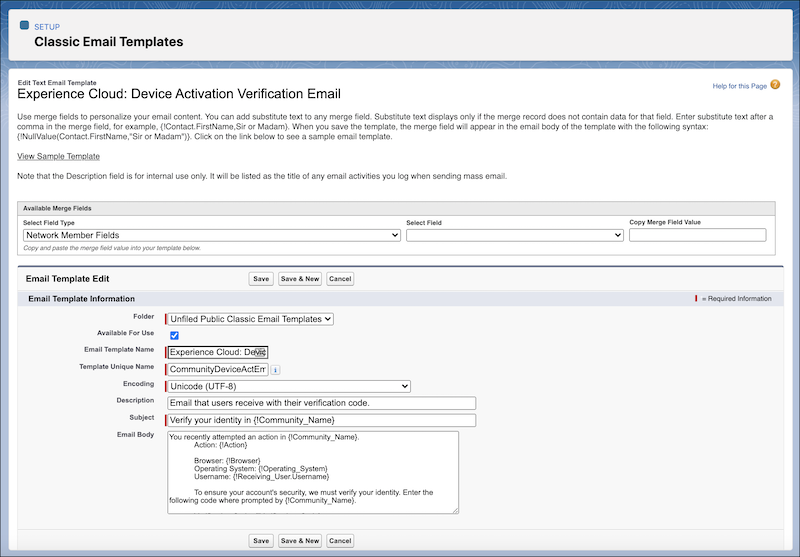
To customize the notification, edit the email template.
- From Setup, in the Quick Find box, enter Email Templates, and then select Classic Email Templates.
- Next to Experience Cloud: Device Activation Verification Email, click Edit.
- Edit the text in the email body.
 Important Don't remove
{!Verification_Code}.- Optionally, to personalize the text, use the available merge fields listed at the top of the page. For more information, see Merge Fields for Experience Cloud Sites.