Experience Cloud uses Chatter behind the scenes for peer-to-peer conversations in
Experience Cloud sites. To keep conversations in your internal org separate from the ones in an
external-facing site, each Chatter post or conversation is tied to the Experience Cloud site
that it belongs to. If you have more than one external-facing site, the same is true for
conversations in each site—each one is tied to the site that it belongs to.
Required Editions
| Available in: Salesforce Classic and Lightning Experience |
| Available in: Enterprise, Performance, Unlimited,
and Developer Editions |
| Applies to: Aura and Visualforce sites |
You don’t have to worry about your Experience Cloud site users seeing your internal Chatter
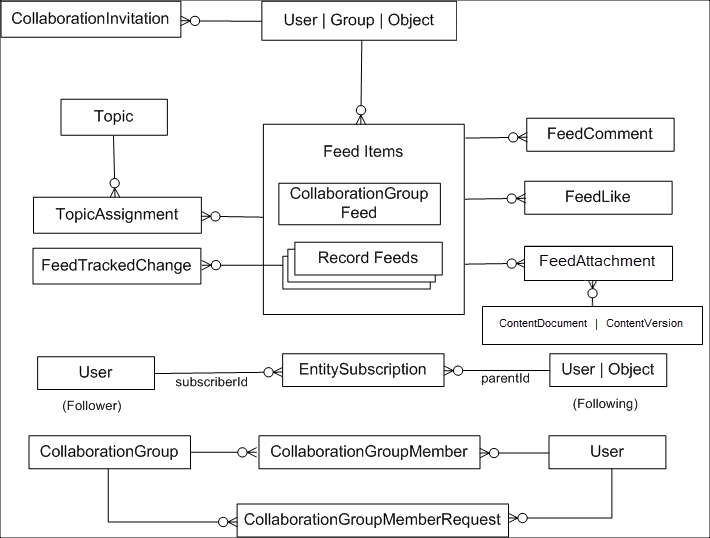
conversations, or vice versa. Here are the primary objects behind Chatter.
Here’s what the key objects represent in terms of your peer-to-peer conversations.
Here are a few other important objects to be aware of.
- Contact—All external site users (people who
don’t work for your company) must first be created as contacts before they can be enabled as
a user of your Experience Cloud site.
- Account—The company that a contact works for.
If you sell B2C and use person accounts, you load the person’s info as a person account and
not a contact. A person account creates a hybrid of an account and contact behind the
scenes.
- Network—The site the forum posts map
into.
- NetworkMember—Tracks the Chatter preferences
for a user in a given site and the reputation points that they’ve earned. These records are
created during your user load. To migrate users’ reputation points, update them at the end
of your migration.